BusyCal: Calendar & Tasks6.7.7
Publisher Description
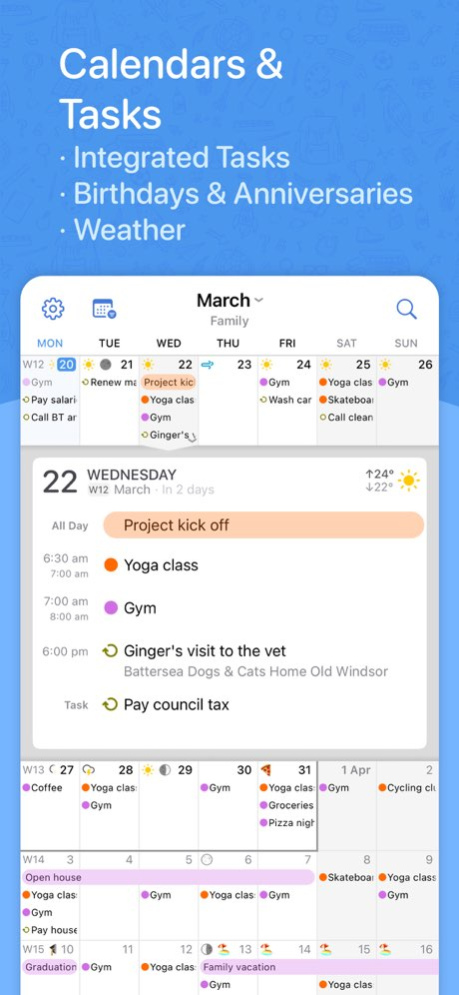


BusyCal is a calendar and task planner built for busy schedules. It connects to every account you already use, shows your events and tasks side by side, and bends to the way you work: pinch to see more days or weeks, type events the way you would say them, and keep everything in sync with BusyCal for Mac.
One-time purchase. No subscription.
YOUR CALENDAR, YOUR WAY
. Day, Week, Month, Year and List views, plus a dedicated Task list
. Pinch to zoom: 2 to 14 days per week and 2 to 8 weeks per month, with separate portrait and landscape layouts
. Customize colors, text size, weekend shading, week numbers and working hours, or show a Chinese, Hebrew, Islamic or Japanese calendar alongside
. Year view as a wall planner or heat map, with Highlights that reveal your busiest months, top calendars and meeting stats
TYPE IT THE WAY YOU WOULD SAY IT
. Type "Lunch with Sam next Tuesday at noon" or "Standup every weekday at 9:30" and BusyCal fills in the date, time and repeat as you type
. Understands alarms, time zones, calendars (/work) and links, in English, German, French, Italian, Spanish, Dutch, Japanese, Korean and Simplified Chinese
TASKS IN YOUR CALENDAR
. Dated, timed and undated tasks appear right in your calendar and carry forward until done
. Priorities, repeats, and a Task list you can sort by due date, priority, calendar, tag or by hand
. Works with Apple Reminders, iCloud, Google Tasks, Todoist and Fastmail
EVERY ACCOUNT, ONE APP
. iCloud, Google Calendar, Microsoft 365, Outlook.com, Exchange, Yahoo, Fastmail, Fruux and any CalDAV server, plus WebDAV subscriptions for holidays and sports
. Push updates where your server supports them, and accounts you add once are offered to your other devices
. Syncs with BusyCal for Mac, Apple Calendar and any other app on the same accounts
MEETINGS AND INVITES
. Invite attendees, and accept, decline or reply Maybe straight from the Inbox
. Zoom, Microsoft Teams, Google Meet, Webex and GoTo links become one-tap join buttons, and you can create Zoom and Teams meetings from inside the app
. Block time on a second calendar in a couple of taps, with or without the details
WIDGETS, WATCH, SIRI AND SHORTCUTS
. Home Screen widgets for what is next, your agenda, the week, two weeks, three weeks, and tasks you can complete from the widget
. Lock Screen widgets and Control Center buttons for new events and tasks
. Apple Watch app with calendar, today, up next and tasks views, plus complications for your watch face
. Siri: "Add lunch with Sam tomorrow at noon", "What's coming up", "When am I free"
. Shortcuts actions to find, create, move, defer and complete items, and a Focus filter that switches calendar sets
TRAVEL TIME, MAPS AND TIME ZONES
. Add travel time to an event and get a leave-now alert based on real driving or walking time
. Maps inside event details, with directions in Apple Maps, Google Maps, Waze, Citymapper or TomTom GO
. Favorite time zones, and events that start and end in different zones
TAGS, CALENDAR SETS AND PRIVACY
. Color-coded tags to track projects, people and priorities across calendars
. Calendar sets: named groups of calendars, each with its own default calendars and preferred view, synced across your devices
. Lock the app, or just certain calendar sets, with Face ID or Touch ID
AND MORE
. Weather and moon phases on your calendar
. Birthdays and anniversaries from Contacts, with age and years
. Search titles, locations, notes and tags across past and future
BusyCal has been trusted by Mac users for more than a decade. The iPhone and iPad app is its full-featured companion, made by the same team.
Questions? Visit busymac.com/docs or write to us from within the app.
Version History · [NEW] Added Year as a preferred view for Calendar Sets on iPad
· Improved Siri support for managing events and tasks
· Improved search field placement in time zone and account-sharing settings
· Improved natural language entry for floating events and recurring schedules across time zones
· Improved Outlook sync for recurring events with custom time zones
· Improved CalDAV sync reliability, including initial syncing with shared DAViCal calendars
· Improved meeting invitation and reply handling for Outlook and CalDAV accounts
· Improved Todoist reminder syncing after task edits
· Fixed Day and Week views shifting to another position after saving an event
· Fixed recurring task details switching to the next occurrence immediately after completion
· Fixed Apple Calendar and Reminders accounts sometimes being unavailable to connect
· Fixed linked contact names not following the expected name order
· Fixed dragging individual recurring occurrences between all-day and timed sections
· Fixed Google sync getting stuck after rejected event privacy changes
· Fixed duplicate events when reimporting calendar files and improved handling of recurring-event changes
· Fixed Korean lunar birthdays imported from Apple Contacts
· Corrected date handling when using alternative system calendars
· Ongoing stability and performance enhancements 6.7.7 Oct 5 · [NEW] New support for pasting multiple email addresses when adding attendees
· [NEW] New 30-minute snooze option for event and task notifications
· Improved recurring time blocks across time zone and daylight saving changes
· Improved Outlook syncing for events using certain custom time zones
· Improved syncing with SOGo and shared DAViCal calendars
· Improved Apple Watch syncing and background stability
· Improved error messages for Microsoft sign-in and CalDAV sync failures
· Fixed time blocking of recurring events to offer a choice between one occurrence and the entire series
· Fixed resizing of floating events in Day and Week views
· Fixed incorrect dimming of floating and all-day events in different time zones
· Fixed an extra day being highlighted when editing all-day events
· Fixed week numbers overlapping dates in Month view in some locales
· Fixed duplicate recurring tasks when syncing with Outlook
· Fixed syncing of edits and deletions to individual occurrences in Outlook
· Fixed duplicate subscribed calendars showing up for certain WebDAV subscriptions
· Ongoing stability and performance enhancements 6.7.6 Sep 24 · [NEW] Siri AI and Shortcuts related improvements and additions
· [NEW] Added support for Google Calendar’s expanded palette and custom event colors
· [NEW] New option in Settings New Event Defaults to choose whether tapping the + button creates an event or a task, instead of the automatic default
· [NEW] Add guests to Google meetings you've been invited to, when the organizer allows it
· [NEW] New Year Planner option to align weekdays across months, wall-planner style. Rotate to landscape to see Year View option
· [NEW] New and improved settings screen
· [NEW] Redesigned first-run setup, making it quicker to add your accounts when you start out
· [NEW] New option to reorder accounts from Settings, so calendars from one account can be listed above another
· [NEW] Rearrange calendars and accounts directly from a Calendar Set's edit screen, with a Sort Alphabetically option for each account
· [NEW] New setting to choose how phone numbers in event notes are called, including FaceTime, WhatsApp, Google Voice and Zoom
· [NEW] New Remove Blocking command in the Block on Calendar menu, which now also checkmarks the calendars an event is already blocked on
· [NEW] New Include All-Day Tasks setting to show or hide all-day tasks in the calendar
· [NEW] Hide tasks assigned to others setting for Todoist accounts
· [NEW] Added Russian localization
· Improved overall reliability of Google Calendar syncing for meetings, RSVPs, and shared calendars
· Improvements to the lock feature; you can now lock and unlock BusyCal with your device passcode when Face ID is not available
· Calendar sorting within the Task List now uses the same calendar order visible in Settings Account Calendars. Calendars can be sorted alphabetically from the same settings screen
· WebDAV Calendar Titles are now visible in the main Accounts screen
· Improved calendar imports to better handle invalid .ics files
· Improved location searches for places outside your current area
· Optimizations to launch times and memory usage
· Improved handling of meeting responses on Office 365 accounts
· Smoother scrolling in Month view, including days with event graphics
· Export to CSV now has a Select All option
· Fixed the calendar landing on the wrong date when opening the app or switching between views
· Fixed Google Tasks not moving to their new list in BusyCal when moved in Google
· Fixed meeting invitations on Microsoft 365 and Outlook accounts not appearing in the Inbox when the invite was sent to a group or distribution list
· Fixed an issue where temperatures could appear on the wrong date
· Fixed the forecast not appearing until the app was reopened after allowing access to your location
· Ongoing stability and performance enhancements 6.7.5 Sep 14 · [NEW] Siri AI and Shortcuts related improvements and additions
· [NEW] Added support for Google Calendar’s expanded palette and custom event colors
· [NEW] New option in Settings New Event Defaults to choose whether tapping the + button creates an event or a task, instead of the automatic default
· [NEW] Add guests to Google meetings you've been invited to, when the organizer allows it
· [NEW] New Year Planner option to align weekdays across months, wall-planner style. Rotate to landscape to see Year View option
· [NEW] New and improved settings screen
· [NEW] Redesigned first-run setup, making it quicker to add your accounts when you start out
· [NEW] New option to reorder accounts from Settings, so calendars from one account can be listed above another
· [NEW] Rearrange calendars and accounts directly from a Calendar Set's edit screen, with a Sort Alphabetically option for each account
· [NEW] New setting to choose how phone numbers in event notes are called, including FaceTime, WhatsApp, Google Voice and Zoom
· [NEW] New Remove Blocking command in the Block on Calendar menu, which now also checkmarks the calendars an event is already blocked on
· [NEW] New Include All-Day Tasks setting to show or hide all-day tasks in the calendar
· [NEW] Hide tasks assigned to others setting for Todoist accounts
· [NEW] Added Russian localization
· Improved overall reliability of Google Calendar syncing for meetings, RSVPs, and shared calendars
· Improvements to the lock feature; you can now lock and unlock BusyCal with your device passcode when Face ID is not available
· Calendar sorting within the Task List now uses the same calendar order visible in Settings Account Calendars. Calendars can be sorted alphabetically from the same settings screen
· WebDAV Calendar Titles are now visible in the main Accounts screen
· Improved calendar imports to better handle invalid .ics files
· Improved location searches for places outside your current area
· Optimizations to launch times and memory usage
· Improved handling of meeting responses on Office 365 accounts
· Smoother scrolling in Month view, including days with event graphics
· Export to CSV now has a Select All option
· Fixed the calendar landing on the wrong date when opening the app or switching between views
· Fixed Google Tasks not moving to their new list in BusyCal when moved in Google
· Fixed meeting invitations on Microsoft 365 and Outlook accounts not appearing in the Inbox when the invite was sent to a group or distribution list
· Fixed an issue where temperatures could appear on the wrong date
· Fixed the forecast not appearing until the app was reopened after allowing access to your location
· Ongoing stability and performance enhancements 6.7.4 Sep 13 · [NEW] Siri AI and Shortcuts related improvements and additions
· [NEW] Added support for Google Calendar’s expanded palette and custom event colors
· [NEW] New option in Settings New Event Defaults to choose whether tapping the + button creates an event or a task, instead of the automatic default
· [NEW] Add guests to Google meetings you've been invited to, when the organizer allows it
· [NEW] New Year Planner option to align weekdays across months, wall-planner style. Rotate to landscape to see Year View option
· [NEW] New and improved settings screen
· [NEW] Redesigned first-run setup, making it quicker to add your accounts when you start out
· [NEW] New option to reorder accounts from Settings, so calendars from one account can be listed above another
· [NEW] Rearrange calendars and accounts directly from a Calendar Set's edit screen, with a Sort Alphabetically option for each account
· [NEW] New setting to choose how phone numbers in event notes are called, including FaceTime, WhatsApp, Google Voice and Zoom
· [NEW] New Remove Blocking command in the Block on Calendar menu, which now also checkmarks the calendars an event is already blocked on
· [NEW] New Include All-Day Tasks setting to show or hide all-day tasks in the calendar
· [NEW] Hide tasks assigned to others setting for Todoist accounts
· [NEW] Added Russian localization
· Improved overall reliability of Google Calendar syncing for meetings, RSVPs, and shared calendars
· Improvements to the lock feature; you can now lock and unlock BusyCal with your device passcode when Face ID is not available
· Calendar sorting within the Task List now uses the same calendar order visible in Settings Account Calendars. Calendars can be sorted alphabetically from the same settings screen
· WebDAV Calendar Titles are now visible in the main Accounts screen
· Improved calendar imports to better handle invalid .ics files
· Improved location searches for places outside your current area
· Optimizations to launch times and memory usage
· Improved handling of meeting responses on Office 365 accounts
· Smoother scrolling in Month view, including days with event graphics
· Export to CSV now has a Select All option
· Fixed the calendar landing on the wrong date when opening the app or switching between views
· Fixed Google Tasks not moving to their new list in BusyCal when moved in Google
· Fixed meeting invitations on Microsoft 365 and Outlook accounts not appearing in the Inbox when the invite was sent to a group or distribution list
· Fixed an issue where temperatures could appear on the wrong date
· Fixed the forecast not appearing until the app was reopened after allowing access to your location
· Ongoing stability and performance enhancements 6.7.3 Sep 12 · [NEW] Siri and Shortcuts related improvements and additions
· [NEW] New option in Settings New Event Defaults to choose whether tapping the + button creates an event or a task, instead of the automatic default
· [NEW] Add guests to Google meetings you've been invited to, when the organizer allows it
· [NEW] New Year Planner option to align weekdays across months, wall-planner style. Rotate to landscape to see Year View option
· [NEW] New and improved settings screen
· [NEW] Redesigned first-run setup, making it quicker to add your accounts when you start out
· [NEW] New option to reorder accounts from Settings, so calendars from one account can be listed above another
· [NEW] Rearrange calendars and accounts directly from a Calendar Set's edit screen, with a Sort Alphabetically option for each account
· [NEW] New setting to choose how phone numbers in event notes are called, including FaceTime, WhatsApp, Google Voice and Zoom
· [NEW] New Remove Blocking command in the Block on Calendar menu, which now also checkmarks the calendars an event is already blocked on
· [NEW] New Include All-Day Tasks setting to show or hide all-day tasks in the calendar
· [NEW] Hide tasks assigned to others setting for Todoist accounts
· [NEW] Added Russian localization
· Improved overall reliability of Google Calendar syncing for meetings, RSVPs, and shared calendars
· Improvements to the lock feature; you can now lock and unlock BusyCal with your device passcode when Face ID is not available
· Calendar sorting within the Task List now uses the same calendar order visible in Settings Account Calendars. Calendars can be sorted alphabetically from the same settings screen
· WebDAV Calendar Titles are now visible in the main Accounts screen
· Improved calendar imports to better handle invalid .ics files
· Improved location searches for places outside your current area
· Optimizations to launch times and memory usage
· Improved handling of meeting responses on Office 365 accounts
· Smoother scrolling in Month view, including days with event graphics
· Export to CSV now has a Select All option
· Fixed the calendar landing on the wrong date when opening the app or switching between views
· Fixed Google Tasks not moving to their new list in BusyCal when moved in Google
· Fixed meeting invitations on Microsoft 365 and Outlook accounts not appearing in the Inbox when the invite was sent to a group or distribution list
· Fixed an issue where temperatures could appear on the wrong date
· Fixed the forecast not appearing until the app was reopened after allowing access to your location
· Ongoing stability and performance enhancements 6.7.2 Sep 10 · [NEW] Siri and Shortcuts related improvements and additions
· [NEW] New option in Settings New Event Defaults to choose whether tapping the + button creates an event or a task, instead of the automatic default
· [NEW] Add guests to Google meetings you've been invited to, when the organizer allows it
· [NEW] New Year Planner option to align weekdays across months, wall-planner style. Rotate to landscape to see Year View option
· [NEW] New and improved settings screen
· [NEW] Redesigned first-run setup, making it quicker to add your accounts when you start out
· [NEW] New option to reorder accounts from Settings, so calendars from one account can be listed above another
· [NEW] Rearrange calendars and accounts directly from a Calendar Set's edit screen, with a Sort Alphabetically option for each account
· [NEW] New setting to choose how phone numbers in event notes are called, including FaceTime, WhatsApp, Google Voice and Zoom
· [NEW] New Remove Blocking command in the Block on Calendar menu, which now also checkmarks the calendars an event is already blocked on
· [NEW] New Include All-Day Tasks setting to show or hide all-day tasks in the calendar
· [NEW] Hide tasks assigned to others setting for Todoist accounts
· [NEW] Added Russian localization
· Improved overall reliability of Google Calendar syncing for meetings, RSVPs, and shared calendars
· Improvements to the lock feature; you can now lock and unlock BusyCal with your device passcode when Face ID is not available
· Calendar sorting within the Task List now uses the same calendar order visible in Settings Account Calendars. Calendars can be sorted alphabetically from the same settings screen
· WebDAV Calendar Titles are now visible in the main Accounts screen
· Improved calendar imports to better handle invalid .ics files
· Improved location searches for places outside your current area
· Optimizations to launch times and memory usage
· Improved handling of meeting responses on Office 365 accounts
· Smoother scrolling in Month view, including days with event graphics
· Export to CSV now has a Select All option
· Fixed the calendar landing on the wrong date when opening the app or switching between views
· Fixed Google Tasks not moving to their new list in BusyCal when moved in Google
· Fixed meeting invitations on Microsoft 365 and Outlook accounts not appearing in the Inbox when the invite was sent to a group or distribution list
· Fixed an issue where temperatures could appear on the wrong date
· Fixed the forecast not appearing until the app was reopened after allowing access to your location
· Ongoing stability and performance enhancements 6.7.1 Sep 8 · [NEW] Siri and Shortcuts related improvements and additions
· [NEW] New option in Settings New Event Defaults to choose whether tapping the + button creates an event or a task, instead of the automatic default
· [NEW] Add guests to Google meetings you've been invited to, when the organizer allows it
· [NEW] New Year Planner option to align weekdays across months, wall-planner style. Rotate to landscape to see Year View option
· [NEW] New and improved settings screen
· [NEW] Redesigned first-run setup, making it quicker to add your accounts when you start out
· [NEW] New option to reorder accounts from Settings, so calendars from one account can be listed above another
· [NEW] Rearrange calendars and accounts directly from a Calendar Set's edit screen, with a Sort Alphabetically option for each account
· [NEW] New setting to choose how phone numbers in event notes are called, including FaceTime, WhatsApp, Google Voice and Zoom
· [NEW] New Remove Blocking command in the Block on Calendar menu, which now also checkmarks the calendars an event is already blocked on
· [NEW] New Include All-Day Tasks setting to show or hide all-day tasks in the calendar
· [NEW] Hide tasks assigned to others setting for Todoist accounts
· [NEW] Added Russian localization
· Improved overall reliability of Google Calendar syncing for meetings, RSVPs, and shared calendars
· Improvements to the lock feature; you can now lock and unlock BusyCal with your device passcode when Face ID is not available
· Calendar sorting within the Task List now uses the same calendar order visible in Settings Account Calendars. Calendars can be sorted alphabetically from the same settings screen
· WebDAV Calendar Titles are now visible in the main Accounts screen
· Improved calendar imports to better handle invalid .ics files
· Improved location searches for places outside your current area
· Optimizations to launch times and memory usage
· Improved handling of meeting responses on Office 365 accounts
· Smoother scrolling in Month view, including days with event graphics
· Export to CSV now has a Select All option
· Fixed the calendar landing on the wrong date when opening the app or switching between views
· Fixed Google Tasks not moving to their new list in BusyCal when moved in Google
· Fixed meeting invitations on Microsoft 365 and Outlook accounts not appearing in the Inbox when the invite was sent to a group or distribution list
· Fixed an issue where temperatures could appear on the wrong date
· Fixed the forecast not appearing until the app was reopened after allowing access to your location
· Ongoing stability and performance enhancements 6.7.0 Sep 7 · [NEW] Siri and Shortcuts related improvements and additions
· [NEW] New option in Settings New Event Defaults to choose whether tapping the + button creates an event or a task, instead of the automatic default
· [NEW] Add guests to Google meetings you've been invited to, when the organizer allows it
· [NEW] New Year Planner option to align weekdays across months, wall-planner style. Rotate to landscape to see Year View option
· [NEW] New and improved settings screen
· [NEW] Redesigned first-run setup, making it quicker to add your accounts when you start out
· [NEW] New option to reorder accounts from Settings, so calendars from one account can be listed above another
· [NEW] Rearrange calendars and accounts directly from a Calendar Set's edit screen, with a Sort Alphabetically option for each account
· [NEW] New setting to choose how phone numbers in event notes are called, including FaceTime, WhatsApp, Google Voice and Zoom
· [NEW] New Remove Blocking command in the Block on Calendar menu, which now also checkmarks the calendars an event is already blocked on
· [NEW] New Include All-Day Tasks setting to show or hide all-day tasks in the calendar
· [NEW] Hide tasks assigned to others setting for Todoist accounts
· [NEW] Added Russian localization
· Improved overall reliability of Google Calendar syncing for meetings, RSVPs, and shared calendars
· Improvements to the lock feature; you can now lock and unlock BusyCal with your device passcode when Face ID is not available
· Calendar sorting within the Task List now uses the same calendar order visible in Settings Account Calendars. Calendars can be sorted alphabetically from the same settings screen
· WebDAV Calendar Titles are now visible in the main Accounts screen
· Improved calendar imports to better handle invalid .ics files
· Improved location searches for places outside your current area
· Optimizations to launch times and memory usage
· Improved handling of meeting responses on Office 365 accounts
· Smoother scrolling in Month view, including days with event graphics
· Export to CSV now has a Select All option
· Fixed the calendar landing on the wrong date when opening the app or switching between views
· Fixed Google Tasks not moving to their new list in BusyCal when moved in Google
· Fixed meeting invitations on Microsoft 365 and Outlook accounts not appearing in the Inbox when the invite was sent to a group or distribution list
· Fixed an issue where temperatures could appear on the wrong date
· Fixed the forecast not appearing until the app was reopened after allowing access to your location
· Ongoing stability and performance enhancements 6.6.5 Sep 6 · [NEW] New natural language support for creating recurring events from phrases like every day, every month, or every year
· [NEW] Added Natural Language support in Quick Entry for Japanese
· Improved CalDAV sync to detect and apply account setting changes made after the initial sync
· Improvements to Outlook sync when syncing with Microsoft Todo Lists
· Improvements to Simplified Chinese localization
· Improved detection of Teams meeting support in Microsoft Office accounts
· Fixed an issue where accepted Microsoft 365 meeting invitations could remain marked as Tentative in BusyCal
· Fixed a bug where weather would not refresh after a day if the time zone changed
· Fixed an issue with Microsoft Graph task time zone handling when mailbox settings could not be retrieved
· Ongoing stability and performance enhancements 6.6.4 Jul 31 · [NEW] Availability Viewer when adding attendees to a meeting
· Reliability improvements for Reminders Sync. To avoid unexpected behavior, BusyCal now syncs the last 12 months of completed tasks from Reminders only
· Improvements to Natural Language Processing
· Fixed a bug where month alignment preference would not be applied at times
· Fixed a bug where a blocking event on a Microsoft Graph calendar would at times replicate itself after sync
· Ongoing stability and performance enhancements 6.6.3 Jul 23 · Fixed a bug where month alignment preference would not be applied at times
· Fixed a bug where a blocking event on a Microsoft Graph calendar would at times replicate itself after sync
· Ongoing stability and performance enhancements 6.6.2 May 13 · [NEW] Export your calendars as CSV from Settings Export as CSV, to be used in spreadsheets or other apps.
· [NEW] Travel time in blocking events. A new Advanced preference lets time-blocking events on other calendars start earlier to cover an event's travel time. See Settings Advanced.
· [NEW] Automatic time-blocking rules (per calendar) now sync across all copies of BusyCal on macOS and iOS. Editing rules is currently available on BusyCal's mac version only.
· Improved compatibility with third-party CalDAV servers
· Further improvements to automatically updating linked time-blocking events when the main event changes during sync
· Fixed a bug with Task regeneration style 'completion date'
· Fixed a bug with timed tasks would get excluded from the upcoming complication
· Ongoing stability and performance enhancements 6.6.1 Apr 27 · [NEW] Export your calendars as CSV from Settings Export as CSV, to be used in spreadsheets or other apps.
· [NEW] Travel time in blocking events. A new Advanced preference lets time-blocking events on other calendars start earlier to cover an event's travel time. See Settings Advanced.
· [NEW] Automatic time-blocking rules (per calendar) now sync across all copies of BusyCal on macOS and iOS. Editing rules is currently available on BusyCal's mac version only.
· Improved compatibility with third-party CalDAV servers
· Further improvements to automatically updating linked time-blocking events when the main event changes during sync
· Fixed a bug with Task regeneration style 'completion date'
· Fixed a bug with timed tasks would get excluded from the upcoming complication
· Ongoing stability and performance enhancements 6.6.0 Apr 24 · [NEW] 'Enable Group Calendars' option added to the Microsoft Office 365 account setup screen
· During a cold restart the week view would at times reset to showing fewer days than previously configured
· Ongoing stability and performance enhancements 6.5.92 Apr 10 · A second tap on the Task toolbar button now scrolls to Today, when possible
· Improved handling of missing mailboxes when syncing with Microsoft Graph
· Fixed an issue where a canceled occurrence could remain visible in some cases when syncing with Microsoft Graph
· Ongoing stability and performance enhancements 6.5.91 Apr 3 · Ongoing stability and performance enhancements 6.5.9 Apr 2 · Fixed a crash caused by an invalid location in a proximity alert
· Ongoing stability and performance enhancements 6.5.8 Mar 29 · Ongoing stability and performance enhancements 6.5.7 Mar 28 · Improved handling of cases where Reminders would stop returning stable identifiers during sync for recurring tasks, resulting in duplicate tasks
· Ongoing stability and performance enhancements 6.5.6 Mar 27 · Snoozes now survive reboots and are correctly dismissed if the event is rescheduled or deleted
· Fixed a crash in the watch app
· Fixed a bug where alarms for all-day events would at times go off at at random times
· Ongoing stability and performance enhancements 6.5.5 Mar 25 · [NEW] Added long-tap context menu option for 'Edit Notes' to skip multiple taps
· Improved compatibility with some self-hosted CalDAV servers
· Fixed bug where changing the end time of a task with duration would not update the duration from day / week views
· Improvements to conference call detection
· Handled a bug where Todoist would send a bogus project ID for deleted tasks
· Fixed a bug around all-day to timed-event conversion
· Fixed a bug where alarms for all-day events would at times go off at at random times
· Ongoing stability and performance enhancements 6.5.4 Mar 24 · [NEW] Added long-tap context menu option for 'Edit Notes' to skip multiple taps
· Improved compatibility with some self-hosted CalDAV servers
· Fixed bug where changing the end time of a task with duration would not update the duration from day / week views
· Improvements to conference call detection
· Handled a bug where Todoist would send a bogus project ID for deleted tasks
· Fixed a bug where alarms for all-day events would at times go off at at random times
· Ongoing stability and performance enhancements 6.5.3 Mar 22 · [NEW] Added long-tap context menu option for 'Edit Notes' to skip multiple taps
· Improved compatibility with some self-hosted CalDAV servers
· Fixed bug where changing the end time of a task with duration would not update the duration from day / week views
· Handled a bug where Todoist would send a bogus project ID for deleted tasks
· Fixed a bug where alarms for all-day events would at times go off at at random times
· Ongoing stability and performance enhancements 6.5.2 Mar 20 · Improved compatibility with Stalwart CalDAV server
· Improved reliability when opening Apple Maps from BusyCal location links
· Improved alarm snoozing and dismissal handling from notifications
· Fixed a bug where Todoist's legacy identifiers were not being recognized in certain cases
· Fixed privacy row not showing for new events for some users
· Fixed bug where opening a recurring occurrence from notifications would sometimes open the wrong occurrence
· Fixed a race condition where selected times could revert when switching views while editing an event
· Fixed bug where the 'Skip syncing color' option under calendar settings would not show for some accounts
· Ongoing stability and performance enhancements 6.5.1 Feb 15
About BusyCal: Calendar & Tasks
The company that develops BusyCal: Calendar & Tasks is Busy Apps FZE. The latest version released by its developer is 6.7.7.
To install BusyCal: Calendar & Tasks on your iOS device, just click the green Continue To App button above to start the installation process. The app is listed on our website since 2026-10-14 and was downloaded 18 times. We have already checked if the download link is safe, however for your own protection we recommend that you scan the downloaded app with your antivirus. Your antivirus may detect the BusyCal: Calendar & Tasks as malware if the download link is broken.
How to install BusyCal: Calendar & Tasks on your iOS device:
- Click on the Continue To App button on our website. This will redirect you to the App Store.
- Once the BusyCal: Calendar & Tasks is shown in the iTunes listing of your iOS device, you can start its download and installation. Tap on the GET button to the right of the app to start downloading it.
- If you are not logged-in the iOS appstore app, you'll be prompted for your your Apple ID and/or password.
- After BusyCal: Calendar & Tasks is downloaded, you'll see an INSTALL button to the right. Tap on it to start the actual installation of the iOS app.
- Once installation is finished you can tap on the OPEN button to start it. Its icon will also be added to your device home screen.
Program Details
System requirements
Download information
Pricing
Version History
version 6.7.7
posted on 2026-10-14
Version History · [NEW] Added Year as a preferred view for Calendar Sets on iPad
· Improved Siri support for managing events and tasks
· Improved search field placement in time zone and account-sharing settings
· Improved natural language entry for floating events and recurring schedules across time zones
· Improved Outlook sync for recurring events with custom time zones
· Improved CalDAV sync reliability, including initial syncing with shared DAViCal calendars
· Improved meeting invitation and reply handling for Outlook and CalDAV accounts
· Improved Todoist reminder syncing after task edits
· Fixed Day and Week views shifting to another position after saving an event
· Fixed recurring task details switching to the next occurrence immediately after completion
· Fixed Apple Calendar and Reminders accounts sometimes being unavailable to connect
· Fixed linked contact names not following the expected name order
· Fixed dragging individual recurring occurrences between all-day and timed sections
· Fixed Google sync getting stuck after rejected event privacy changes
· Fixed duplicate events when reimporting calendar files and improved handling of recurring-event changes
· Fixed Korean lunar birthdays imported from Apple Contacts
· Corrected date handling when using alternative system calendars
· Ongoing stability and performance enhancements 6.7.7 Oct 5 · [NEW] New support for pasting multiple email addresses when adding attendees
· [NEW] New 30-minute snooze option for event and task notifications
· Improved recurring time blocks across time zone and daylight saving changes
· Improved Outlook syncing for events using certain custom time zones
· Improved syncing with SOGo and shared DAViCal calendars
· Improved Apple Watch syncing and background stability
· Improved error messages for Microsoft sign-in and CalDAV sync failures
· Fixed time blocking of recurring events to offer a choice between one occurrence and the entire series
· Fixed resizing of floating events in Day and Week views
· Fixed incorrect dimming of floating and all-day events in different time zones
· Fixed an extra day being highlighted when editing all-day events
· Fixed week numbers overlapping dates in Month view in some locales
· Fixed duplicate recurring tasks when syncing with Outlook
· Fixed syncing of edits and deletions to individual occurrences in Outlook
· Fixed duplicate subscribed calendars showing up for certain WebDAV subscriptions
· Ongoing stability and performance enhancements 6.7.6 Sep 24 · [NEW] Siri AI and Shortcuts related improvements and additions
· [NEW] Added support for Google Calendar’s expanded palette and custom event colors
· [NEW] New option in Settings New Event Defaults to choose whether tapping the + button creates an event or a task, instead of the automatic default
· [NEW] Add guests to Google meetings you've been invited to, when the organizer allows it
· [NEW] New Year Planner option to align weekdays across months, wall-planner style. Rotate to landscape to see Year View option
· [NEW] New and improved settings screen
· [NEW] Redesigned first-run setup, making it quicker to add your accounts when you start out
· [NEW] New option to reorder accounts from Settings, so calendars from one account can be listed above another
· [NEW] Rearrange calendars and accounts directly from a Calendar Set's edit screen, with a Sort Alphabetically option for each account
· [NEW] New setting to choose how phone numbers in event notes are called, including FaceTime, WhatsApp, Google Voice and Zoom
· [NEW] New Remove Blocking command in the Block on Calendar menu, which now also checkmarks the calendars an event is already blocked on
· [NEW] New Include All-Day Tasks setting to show or hide all-day tasks in the calendar
· [NEW] Hide tasks assigned to others setting for Todoist accounts
· [NEW] Added Russian localization
· Improved overall reliability of Google Calendar syncing for meetings, RSVPs, and shared calendars
· Improvements to the lock feature; you can now lock and unlock BusyCal with your device passcode when Face ID is not available
· Calendar sorting within the Task List now uses the same calendar order visible in Settings Account Calendars. Calendars can be sorted alphabetically from the same settings screen
· WebDAV Calendar Titles are now visible in the main Accounts screen
· Improved calendar imports to better handle invalid .ics files
· Improved location searches for places outside your current area
· Optimizations to launch times and memory usage
· Improved handling of meeting responses on Office 365 accounts
· Smoother scrolling in Month view, including days with event graphics
· Export to CSV now has a Select All option
· Fixed the calendar landing on the wrong date when opening the app or switching between views
· Fixed Google Tasks not moving to their new list in BusyCal when moved in Google
· Fixed meeting invitations on Microsoft 365 and Outlook accounts not appearing in the Inbox when the invite was sent to a group or distribution list
· Fixed an issue where temperatures could appear on the wrong date
· Fixed the forecast not appearing until the app was reopened after allowing access to your location
· Ongoing stability and performance enhancements 6.7.5 Sep 14 · [NEW] Siri AI and Shortcuts related improvements and additions
· [NEW] Added support for Google Calendar’s expanded palette and custom event colors
· [NEW] New option in Settings New Event Defaults to choose whether tapping the + button creates an event or a task, instead of the automatic default
· [NEW] Add guests to Google meetings you've been invited to, when the organizer allows it
· [NEW] New Year Planner option to align weekdays across months, wall-planner style. Rotate to landscape to see Year View option
· [NEW] New and improved settings screen
· [NEW] Redesigned first-run setup, making it quicker to add your accounts when you start out
· [NEW] New option to reorder accounts from Settings, so calendars from one account can be listed above another
· [NEW] Rearrange calendars and accounts directly from a Calendar Set's edit screen, with a Sort Alphabetically option for each account
· [NEW] New setting to choose how phone numbers in event notes are called, including FaceTime, WhatsApp, Google Voice and Zoom
· [NEW] New Remove Blocking command in the Block on Calendar menu, which now also checkmarks the calendars an event is already blocked on
· [NEW] New Include All-Day Tasks setting to show or hide all-day tasks in the calendar
· [NEW] Hide tasks assigned to others setting for Todoist accounts
· [NEW] Added Russian localization
· Improved overall reliability of Google Calendar syncing for meetings, RSVPs, and shared calendars
· Improvements to the lock feature; you can now lock and unlock BusyCal with your device passcode when Face ID is not available
· Calendar sorting within the Task List now uses the same calendar order visible in Settings Account Calendars. Calendars can be sorted alphabetically from the same settings screen
· WebDAV Calendar Titles are now visible in the main Accounts screen
· Improved calendar imports to better handle invalid .ics files
· Improved location searches for places outside your current area
· Optimizations to launch times and memory usage
· Improved handling of meeting responses on Office 365 accounts
· Smoother scrolling in Month view, including days with event graphics
· Export to CSV now has a Select All option
· Fixed the calendar landing on the wrong date when opening the app or switching between views
· Fixed Google Tasks not moving to their new list in BusyCal when moved in Google
· Fixed meeting invitations on Microsoft 365 and Outlook accounts not appearing in the Inbox when the invite was sent to a group or distribution list
· Fixed an issue where temperatures could appear on the wrong date
· Fixed the forecast not appearing until the app was reopened after allowing access to your location
· Ongoing stability and performance enhancements 6.7.4 Sep 13 · [NEW] Siri AI and Shortcuts related improvements and additions
· [NEW] Added support for Google Calendar’s expanded palette and custom event colors
· [NEW] New option in Settings New Event Defaults to choose whether tapping the + button creates an event or a task, instead of the automatic default
· [NEW] Add guests to Google meetings you've been invited to, when the organizer allows it
· [NEW] New Year Planner option to align weekdays across months, wall-planner style. Rotate to landscape to see Year View option
· [NEW] New and improved settings screen
· [NEW] Redesigned first-run setup, making it quicker to add your accounts when you start out
· [NEW] New option to reorder accounts from Settings, so calendars from one account can be listed above another
· [NEW] Rearrange calendars and accounts directly from a Calendar Set's edit screen, with a Sort Alphabetically option for each account
· [NEW] New setting to choose how phone numbers in event notes are called, including FaceTime, WhatsApp, Google Voice and Zoom
· [NEW] New Remove Blocking command in the Block on Calendar menu, which now also checkmarks the calendars an event is already blocked on
· [NEW] New Include All-Day Tasks setting to show or hide all-day tasks in the calendar
· [NEW] Hide tasks assigned to others setting for Todoist accounts
· [NEW] Added Russian localization
· Improved overall reliability of Google Calendar syncing for meetings, RSVPs, and shared calendars
· Improvements to the lock feature; you can now lock and unlock BusyCal with your device passcode when Face ID is not available
· Calendar sorting within the Task List now uses the same calendar order visible in Settings Account Calendars. Calendars can be sorted alphabetically from the same settings screen
· WebDAV Calendar Titles are now visible in the main Accounts screen
· Improved calendar imports to better handle invalid .ics files
· Improved location searches for places outside your current area
· Optimizations to launch times and memory usage
· Improved handling of meeting responses on Office 365 accounts
· Smoother scrolling in Month view, including days with event graphics
· Export to CSV now has a Select All option
· Fixed the calendar landing on the wrong date when opening the app or switching between views
· Fixed Google Tasks not moving to their new list in BusyCal when moved in Google
· Fixed meeting invitations on Microsoft 365 and Outlook accounts not appearing in the Inbox when the invite was sent to a group or distribution list
· Fixed an issue where temperatures could appear on the wrong date
· Fixed the forecast not appearing until the app was reopened after allowing access to your location
· Ongoing stability and performance enhancements 6.7.3 Sep 12 · [NEW] Siri and Shortcuts related improvements and additions
· [NEW] New option in Settings New Event Defaults to choose whether tapping the + button creates an event or a task, instead of the automatic default
· [NEW] Add guests to Google meetings you've been invited to, when the organizer allows it
· [NEW] New Year Planner option to align weekdays across months, wall-planner style. Rotate to landscape to see Year View option
· [NEW] New and improved settings screen
· [NEW] Redesigned first-run setup, making it quicker to add your accounts when you start out
· [NEW] New option to reorder accounts from Settings, so calendars from one account can be listed above another
· [NEW] Rearrange calendars and accounts directly from a Calendar Set's edit screen, with a Sort Alphabetically option for each account
· [NEW] New setting to choose how phone numbers in event notes are called, including FaceTime, WhatsApp, Google Voice and Zoom
· [NEW] New Remove Blocking command in the Block on Calendar menu, which now also checkmarks the calendars an event is already blocked on
· [NEW] New Include All-Day Tasks setting to show or hide all-day tasks in the calendar
· [NEW] Hide tasks assigned to others setting for Todoist accounts
· [NEW] Added Russian localization
· Improved overall reliability of Google Calendar syncing for meetings, RSVPs, and shared calendars
· Improvements to the lock feature; you can now lock and unlock BusyCal with your device passcode when Face ID is not available
· Calendar sorting within the Task List now uses the same calendar order visible in Settings Account Calendars. Calendars can be sorted alphabetically from the same settings screen
· WebDAV Calendar Titles are now visible in the main Accounts screen
· Improved calendar imports to better handle invalid .ics files
· Improved location searches for places outside your current area
· Optimizations to launch times and memory usage
· Improved handling of meeting responses on Office 365 accounts
· Smoother scrolling in Month view, including days with event graphics
· Export to CSV now has a Select All option
· Fixed the calendar landing on the wrong date when opening the app or switching between views
· Fixed Google Tasks not moving to their new list in BusyCal when moved in Google
· Fixed meeting invitations on Microsoft 365 and Outlook accounts not appearing in the Inbox when the invite was sent to a group or distribution list
· Fixed an issue where temperatures could appear on the wrong date
· Fixed the forecast not appearing until the app was reopened after allowing access to your location
· Ongoing stability and performance enhancements 6.7.2 Sep 10 · [NEW] Siri and Shortcuts related improvements and additions
· [NEW] New option in Settings New Event Defaults to choose whether tapping the + button creates an event or a task, instead of the automatic default
· [NEW] Add guests to Google meetings you've been invited to, when the organizer allows it
· [NEW] New Year Planner option to align weekdays across months, wall-planner style. Rotate to landscape to see Year View option
· [NEW] New and improved settings screen
· [NEW] Redesigned first-run setup, making it quicker to add your accounts when you start out
· [NEW] New option to reorder accounts from Settings, so calendars from one account can be listed above another
· [NEW] Rearrange calendars and accounts directly from a Calendar Set's edit screen, with a Sort Alphabetically option for each account
· [NEW] New setting to choose how phone numbers in event notes are called, including FaceTime, WhatsApp, Google Voice and Zoom
· [NEW] New Remove Blocking command in the Block on Calendar menu, which now also checkmarks the calendars an event is already blocked on
· [NEW] New Include All-Day Tasks setting to show or hide all-day tasks in the calendar
· [NEW] Hide tasks assigned to others setting for Todoist accounts
· [NEW] Added Russian localization
· Improved overall reliability of Google Calendar syncing for meetings, RSVPs, and shared calendars
· Improvements to the lock feature; you can now lock and unlock BusyCal with your device passcode when Face ID is not available
· Calendar sorting within the Task List now uses the same calendar order visible in Settings Account Calendars. Calendars can be sorted alphabetically from the same settings screen
· WebDAV Calendar Titles are now visible in the main Accounts screen
· Improved calendar imports to better handle invalid .ics files
· Improved location searches for places outside your current area
· Optimizations to launch times and memory usage
· Improved handling of meeting responses on Office 365 accounts
· Smoother scrolling in Month view, including days with event graphics
· Export to CSV now has a Select All option
· Fixed the calendar landing on the wrong date when opening the app or switching between views
· Fixed Google Tasks not moving to their new list in BusyCal when moved in Google
· Fixed meeting invitations on Microsoft 365 and Outlook accounts not appearing in the Inbox when the invite was sent to a group or distribution list
· Fixed an issue where temperatures could appear on the wrong date
· Fixed the forecast not appearing until the app was reopened after allowing access to your location
· Ongoing stability and performance enhancements 6.7.1 Sep 8 · [NEW] Siri and Shortcuts related improvements and additions
· [NEW] New option in Settings New Event Defaults to choose whether tapping the + button creates an event or a task, instead of the automatic default
· [NEW] Add guests to Google meetings you've been invited to, when the organizer allows it
· [NEW] New Year Planner option to align weekdays across months, wall-planner style. Rotate to landscape to see Year View option
· [NEW] New and improved settings screen
· [NEW] Redesigned first-run setup, making it quicker to add your accounts when you start out
· [NEW] New option to reorder accounts from Settings, so calendars from one account can be listed above another
· [NEW] Rearrange calendars and accounts directly from a Calendar Set's edit screen, with a Sort Alphabetically option for each account
· [NEW] New setting to choose how phone numbers in event notes are called, including FaceTime, WhatsApp, Google Voice and Zoom
· [NEW] New Remove Blocking command in the Block on Calendar menu, which now also checkmarks the calendars an event is already blocked on
· [NEW] New Include All-Day Tasks setting to show or hide all-day tasks in the calendar
· [NEW] Hide tasks assigned to others setting for Todoist accounts
· [NEW] Added Russian localization
· Improved overall reliability of Google Calendar syncing for meetings, RSVPs, and shared calendars
· Improvements to the lock feature; you can now lock and unlock BusyCal with your device passcode when Face ID is not available
· Calendar sorting within the Task List now uses the same calendar order visible in Settings Account Calendars. Calendars can be sorted alphabetically from the same settings screen
· WebDAV Calendar Titles are now visible in the main Accounts screen
· Improved calendar imports to better handle invalid .ics files
· Improved location searches for places outside your current area
· Optimizations to launch times and memory usage
· Improved handling of meeting responses on Office 365 accounts
· Smoother scrolling in Month view, including days with event graphics
· Export to CSV now has a Select All option
· Fixed the calendar landing on the wrong date when opening the app or switching between views
· Fixed Google Tasks not moving to their new list in BusyCal when moved in Google
· Fixed meeting invitations on Microsoft 365 and Outlook accounts not appearing in the Inbox when the invite was sent to a group or distribution list
· Fixed an issue where temperatures could appear on the wrong date
· Fixed the forecast not appearing until the app was reopened after allowing access to your location
· Ongoing stability and performance enhancements 6.7.0 Sep 7 · [NEW] Siri and Shortcuts related improvements and additions
· [NEW] New option in Settings New Event Defaults to choose whether tapping the + button creates an event or a task, instead of the automatic default
· [NEW] Add guests to Google meetings you've been invited to, when the organizer allows it
· [NEW] New Year Planner option to align weekdays across months, wall-planner style. Rotate to landscape to see Year View option
· [NEW] New and improved settings screen
· [NEW] Redesigned first-run setup, making it quicker to add your accounts when you start out
· [NEW] New option to reorder accounts from Settings, so calendars from one account can be listed above another
· [NEW] Rearrange calendars and accounts directly from a Calendar Set's edit screen, with a Sort Alphabetically option for each account
· [NEW] New setting to choose how phone numbers in event notes are called, including FaceTime, WhatsApp, Google Voice and Zoom
· [NEW] New Remove Blocking command in the Block on Calendar menu, which now also checkmarks the calendars an event is already blocked on
· [NEW] New Include All-Day Tasks setting to show or hide all-day tasks in the calendar
· [NEW] Hide tasks assigned to others setting for Todoist accounts
· [NEW] Added Russian localization
· Improved overall reliability of Google Calendar syncing for meetings, RSVPs, and shared calendars
· Improvements to the lock feature; you can now lock and unlock BusyCal with your device passcode when Face ID is not available
· Calendar sorting within the Task List now uses the same calendar order visible in Settings Account Calendars. Calendars can be sorted alphabetically from the same settings screen
· WebDAV Calendar Titles are now visible in the main Accounts screen
· Improved calendar imports to better handle invalid .ics files
· Improved location searches for places outside your current area
· Optimizations to launch times and memory usage
· Improved handling of meeting responses on Office 365 accounts
· Smoother scrolling in Month view, including days with event graphics
· Export to CSV now has a Select All option
· Fixed the calendar landing on the wrong date when opening the app or switching between views
· Fixed Google Tasks not moving to their new list in BusyCal when moved in Google
· Fixed meeting invitations on Microsoft 365 and Outlook accounts not appearing in the Inbox when the invite was sent to a group or distribution list
· Fixed an issue where temperatures could appear on the wrong date
· Fixed the forecast not appearing until the app was reopened after allowing access to your location
· Ongoing stability and performance enhancements 6.6.5 Sep 6 · [NEW] New natural language support for creating recurring events from phrases like every day, every month, or every year
· [NEW] Added Natural Language support in Quick Entry for Japanese
· Improved CalDAV sync to detect and apply account setting changes made after the initial sync
· Improvements to Outlook sync when syncing with Microsoft Todo Lists
· Improvements to Simplified Chinese localization
· Improved detection of Teams meeting support in Microsoft Office accounts
· Fixed an issue where accepted Microsoft 365 meeting invitations could remain marked as Tentative in BusyCal
· Fixed a bug where weather would not refresh after a day if the time zone changed
· Fixed an issue with Microsoft Graph task time zone handling when mailbox settings could not be retrieved
· Ongoing stability and performance enhancements 6.6.4 Jul 31 · [NEW] Availability Viewer when adding attendees to a meeting
· Reliability improvements for Reminders Sync. To avoid unexpected behavior, BusyCal now syncs the last 12 months of completed tasks from Reminders only
· Improvements to Natural Language Processing
· Fixed a bug where month alignment preference would not be applied at times
· Fixed a bug where a blocking event on a Microsoft Graph calendar would at times replicate itself after sync
· Ongoing stability and performance enhancements 6.6.3 Jul 23 · Fixed a bug where month alignment preference would not be applied at times
· Fixed a bug where a blocking event on a Microsoft Graph calendar would at times replicate itself after sync
· Ongoing stability and performance enhancements 6.6.2 May 13 · [NEW] Export your calendars as CSV from Settings Export as CSV, to be used in spreadsheets or other apps.
· [NEW] Travel time in blocking events. A new Advanced preference lets time-blocking events on other calendars start earlier to cover an event's travel time. See Settings Advanced.
· [NEW] Automatic time-blocking rules (per calendar) now sync across all copies of BusyCal on macOS and iOS. Editing rules is currently available on BusyCal's mac version only.
· Improved compatibility with third-party CalDAV servers
· Further improvements to automatically updating linked time-blocking events when the main event changes during sync
· Fixed a bug with Task regeneration style 'completion date'
· Fixed a bug with timed tasks would get excluded from the upcoming complication
· Ongoing stability and performance enhancements 6.6.1 Apr 27 · [NEW] Export your calendars as CSV from Settings Export as CSV, to be used in spreadsheets or other apps.
· [NEW] Travel time in blocking events. A new Advanced preference lets time-blocking events on other calendars start earlier to cover an event's travel time. See Settings Advanced.
· [NEW] Automatic time-blocking rules (per calendar) now sync across all copies of BusyCal on macOS and iOS. Editing rules is currently available on BusyCal's mac version only.
· Improved compatibility with third-party CalDAV servers
· Further improvements to automatically updating linked time-blocking events when the main event changes during sync
· Fixed a bug with Task regeneration style 'completion date'
· Fixed a bug with timed tasks would get excluded from the upcoming complication
· Ongoing stability and performance enhancements 6.6.0 Apr 24 · [NEW] 'Enable Group Calendars' option added to the Microsoft Office 365 account setup screen
· During a cold restart the week view would at times reset to showing fewer days than previously configured
· Ongoing stability and performance enhancements 6.5.92 Apr 10 · A second tap on the Task toolbar button now scrolls to Today, when possible
· Improved handling of missing mailboxes when syncing with Microsoft Graph
· Fixed an issue where a canceled occurrence could remain visible in some cases when syncing with Microsoft Graph
· Ongoing stability and performance enhancements 6.5.91 Apr 3 · Ongoing stability and performance enhancements 6.5.9 Apr 2 · Fixed a crash caused by an invalid location in a proximity alert
· Ongoing stability and performance enhancements 6.5.8 Mar 29 · Ongoing stability and performance enhancements 6.5.7 Mar 28 · Improved handling of cases where Reminders would stop returning stable identifiers during sync for recurring tasks, resulting in duplicate tasks
· Ongoing stability and performance enhancements 6.5.6 Mar 27 · Snoozes now survive reboots and are correctly dismissed if the event is rescheduled or deleted
· Fixed a crash in the watch app
· Fixed a bug where alarms for all-day events would at times go off at at random times
· Ongoing stability and performance enhancements 6.5.5 Mar 25 · [NEW] Added long-tap context menu option for 'Edit Notes' to skip multiple taps
· Improved compatibility with some self-hosted CalDAV servers
· Fixed bug where changing the end time of a task with duration would not update the duration from day / week views
· Improvements to conference call detection
· Handled a bug where Todoist would send a bogus project ID for deleted tasks
· Fixed a bug around all-day to timed-event conversion
· Fixed a bug where alarms for all-day events would at times go off at at random times
· Ongoing stability and performance enhancements 6.5.4 Mar 24 · [NEW] Added long-tap context menu option for 'Edit Notes' to skip multiple taps
· Improved compatibility with some self-hosted CalDAV servers
· Fixed bug where changing the end time of a task with duration would not update the duration from day / week views
· Improvements to conference call detection
· Handled a bug where Todoist would send a bogus project ID for deleted tasks
· Fixed a bug where alarms for all-day events would at times go off at at random times
· Ongoing stability and performance enhancements 6.5.3 Mar 22 · [NEW] Added long-tap context menu option for 'Edit Notes' to skip multiple taps
· Improved compatibility with some self-hosted CalDAV servers
· Fixed bug where changing the end time of a task with duration would not update the duration from day / week views
· Handled a bug where Todoist would send a bogus project ID for deleted tasks
· Fixed a bug where alarms for all-day events would at times go off at at random times
· Ongoing stability and performance enhancements 6.5.2 Mar 20 · Improved compatibility with Stalwart CalDAV server
· Improved reliability when opening Apple Maps from BusyCal location links
· Improved alarm snoozing and dismissal handling from notifications
· Fixed a bug where Todoist's legacy identifiers were not being recognized in certain cases
· Fixed privacy row not showing for new events for some users
· Fixed bug where opening a recurring occurrence from notifications would sometimes open the wrong occurrence
· Fixed a race condition where selected times could revert when switching views while editing an event
· Fixed bug where the 'Skip syncing color' option under calendar settings would not show for some accounts
· Ongoing stability and performance enhancements 6.5.1 Feb 15
version 6.7.7
posted on 2026-10-06
Version History · [NEW] Added Year as a preferred view for Calendar Sets on iPad
· Improved Siri support for managing events and tasks
· Improved search field placement in time zone and account-sharing settings
· Improved natural language entry for floating events and recurring schedules across time zones
· Improved Outlook sync for recurring events with custom time zones
· Improved CalDAV sync reliability, including initial syncing with shared DAViCal calendars
· Improved meeting invitation and reply handling for Outlook and CalDAV accounts
· Improved Todoist reminder syncing after task edits
· Fixed Day and Week views shifting to another position after saving an event
· Fixed recurring task details switching to the next occurrence immediately after completion
· Fixed Apple Calendar and Reminders accounts sometimes being unavailable to connect
· Fixed linked contact names not following the expected name order
· Fixed dragging individual recurring occurrences between all-day and timed sections
· Fixed Google sync getting stuck after rejected event privacy changes
· Fixed duplicate events when reimporting calendar files and improved handling of recurring-event changes
· Fixed Korean lunar birthdays imported from Apple Contacts
· Corrected date handling when using alternative system calendars
· Ongoing stability and performance enhancements 6.7.7 1d ago · [NEW] New support for pasting multiple email addresses when adding attendees
· [NEW] New 30-minute snooze option for event and task notifications
· Improved recurring time blocks across time zone and daylight saving changes
· Improved Outlook syncing for events using certain custom time zones
· Improved syncing with SOGo and shared DAViCal calendars
· Improved Apple Watch syncing and background stability
· Improved error messages for Microsoft sign-in and CalDAV sync failures
· Fixed time blocking of recurring events to offer a choice between one occurrence and the entire series
· Fixed resizing of floating events in Day and Week views
· Fixed incorrect dimming of floating and all-day events in different time zones
· Fixed an extra day being highlighted when editing all-day events
· Fixed week numbers overlapping dates in Month view in some locales
· Fixed duplicate recurring tasks when syncing with Outlook
· Fixed syncing of edits and deletions to individual occurrences in Outlook
· Fixed duplicate subscribed calendars showing up for certain WebDAV subscriptions
· Ongoing stability and performance enhancements 6.7.6 Sep 24 · [NEW] Siri AI and Shortcuts related improvements and additions
· [NEW] Added support for Google Calendar’s expanded palette and custom event colors
· [NEW] New option in Settings New Event Defaults to choose whether tapping the + button creates an event or a task, instead of the automatic default
· [NEW] Add guests to Google meetings you've been invited to, when the organizer allows it
· [NEW] New Year Planner option to align weekdays across months, wall-planner style. Rotate to landscape to see Year View option
· [NEW] New and improved settings screen
· [NEW] Redesigned first-run setup, making it quicker to add your accounts when you start out
· [NEW] New option to reorder accounts from Settings, so calendars from one account can be listed above another
· [NEW] Rearrange calendars and accounts directly from a Calendar Set's edit screen, with a Sort Alphabetically option for each account
· [NEW] New setting to choose how phone numbers in event notes are called, including FaceTime, WhatsApp, Google Voice and Zoom
· [NEW] New Remove Blocking command in the Block on Calendar menu, which now also checkmarks the calendars an event is already blocked on
· [NEW] New Include All-Day Tasks setting to show or hide all-day tasks in the calendar
· [NEW] Hide tasks assigned to others setting for Todoist accounts
· [NEW] Added Russian localization
· Improved overall reliability of Google Calendar syncing for meetings, RSVPs, and shared calendars
· Improvements to the lock feature; you can now lock and unlock BusyCal with your device passcode when Face ID is not available
· Calendar sorting within the Task List now uses the same calendar order visible in Settings Account Calendars. Calendars can be sorted alphabetically from the same settings screen
· WebDAV Calendar Titles are now visible in the main Accounts screen
· Improved calendar imports to better handle invalid .ics files
· Improved location searches for places outside your current area
· Optimizations to launch times and memory usage
· Improved handling of meeting responses on Office 365 accounts
· Smoother scrolling in Month view, including days with event graphics
· Export to CSV now has a Select All option
· Fixed the calendar landing on the wrong date when opening the app or switching between views
· Fixed Google Tasks not moving to their new list in BusyCal when moved in Google
· Fixed meeting invitations on Microsoft 365 and Outlook accounts not appearing in the Inbox when the invite was sent to a group or distribution list
· Fixed an issue where temperatures could appear on the wrong date
· Fixed the forecast not appearing until the app was reopened after allowing access to your location
· Ongoing stability and performance enhancements 6.7.5 Sep 14 · [NEW] Siri AI and Shortcuts related improvements and additions
· [NEW] Added support for Google Calendar’s expanded palette and custom event colors
· [NEW] New option in Settings New Event Defaults to choose whether tapping the + button creates an event or a task, instead of the automatic default
· [NEW] Add guests to Google meetings you've been invited to, when the organizer allows it
· [NEW] New Year Planner option to align weekdays across months, wall-planner style. Rotate to landscape to see Year View option
· [NEW] New and improved settings screen
· [NEW] Redesigned first-run setup, making it quicker to add your accounts when you start out
· [NEW] New option to reorder accounts from Settings, so calendars from one account can be listed above another
· [NEW] Rearrange calendars and accounts directly from a Calendar Set's edit screen, with a Sort Alphabetically option for each account
· [NEW] New setting to choose how phone numbers in event notes are called, including FaceTime, WhatsApp, Google Voice and Zoom
· [NEW] New Remove Blocking command in the Block on Calendar menu, which now also checkmarks the calendars an event is already blocked on
· [NEW] New Include All-Day Tasks setting to show or hide all-day tasks in the calendar
· [NEW] Hide tasks assigned to others setting for Todoist accounts
· [NEW] Added Russian localization
· Improved overall reliability of Google Calendar syncing for meetings, RSVPs, and shared calendars
· Improvements to the lock feature; you can now lock and unlock BusyCal with your device passcode when Face ID is not available
· Calendar sorting within the Task List now uses the same calendar order visible in Settings Account Calendars. Calendars can be sorted alphabetically from the same settings screen
· WebDAV Calendar Titles are now visible in the main Accounts screen
· Improved calendar imports to better handle invalid .ics files
· Improved location searches for places outside your current area
· Optimizations to launch times and memory usage
· Improved handling of meeting responses on Office 365 accounts
· Smoother scrolling in Month view, including days with event graphics
· Export to CSV now has a Select All option
· Fixed the calendar landing on the wrong date when opening the app or switching between views
· Fixed Google Tasks not moving to their new list in BusyCal when moved in Google
· Fixed meeting invitations on Microsoft 365 and Outlook accounts not appearing in the Inbox when the invite was sent to a group or distribution list
· Fixed an issue where temperatures could appear on the wrong date
· Fixed the forecast not appearing until the app was reopened after allowing access to your location
· Ongoing stability and performance enhancements 6.7.4 Sep 13 · [NEW] Siri AI and Shortcuts related improvements and additions
· [NEW] Added support for Google Calendar’s expanded palette and custom event colors
· [NEW] New option in Settings New Event Defaults to choose whether tapping the + button creates an event or a task, instead of the automatic default
· [NEW] Add guests to Google meetings you've been invited to, when the organizer allows it
· [NEW] New Year Planner option to align weekdays across months, wall-planner style. Rotate to landscape to see Year View option
· [NEW] New and improved settings screen
· [NEW] Redesigned first-run setup, making it quicker to add your accounts when you start out
· [NEW] New option to reorder accounts from Settings, so calendars from one account can be listed above another
· [NEW] Rearrange calendars and accounts directly from a Calendar Set's edit screen, with a Sort Alphabetically option for each account
· [NEW] New setting to choose how phone numbers in event notes are called, including FaceTime, WhatsApp, Google Voice and Zoom
· [NEW] New Remove Blocking command in the Block on Calendar menu, which now also checkmarks the calendars an event is already blocked on
· [NEW] New Include All-Day Tasks setting to show or hide all-day tasks in the calendar
· [NEW] Hide tasks assigned to others setting for Todoist accounts
· [NEW] Added Russian localization
· Improved overall reliability of Google Calendar syncing for meetings, RSVPs, and shared calendars
· Improvements to the lock feature; you can now lock and unlock BusyCal with your device passcode when Face ID is not available
· Calendar sorting within the Task List now uses the same calendar order visible in Settings Account Calendars. Calendars can be sorted alphabetically from the same settings screen
· WebDAV Calendar Titles are now visible in the main Accounts screen
· Improved calendar imports to better handle invalid .ics files
· Improved location searches for places outside your current area
· Optimizations to launch times and memory usage
· Improved handling of meeting responses on Office 365 accounts
· Smoother scrolling in Month view, including days with event graphics
· Export to CSV now has a Select All option
· Fixed the calendar landing on the wrong date when opening the app or switching between views
· Fixed Google Tasks not moving to their new list in BusyCal when moved in Google
· Fixed meeting invitations on Microsoft 365 and Outlook accounts not appearing in the Inbox when the invite was sent to a group or distribution list
· Fixed an issue where temperatures could appear on the wrong date
· Fixed the forecast not appearing until the app was reopened after allowing access to your location
· Ongoing stability and performance enhancements 6.7.3 Sep 12 · [NEW] Siri and Shortcuts related improvements and additions
· [NEW] New option in Settings New Event Defaults to choose whether tapping the + button creates an event or a task, instead of the automatic default
· [NEW] Add guests to Google meetings you've been invited to, when the organizer allows it
· [NEW] New Year Planner option to align weekdays across months, wall-planner style. Rotate to landscape to see Year View option
· [NEW] New and improved settings screen
· [NEW] Redesigned first-run setup, making it quicker to add your accounts when you start out
· [NEW] New option to reorder accounts from Settings, so calendars from one account can be listed above another
· [NEW] Rearrange calendars and accounts directly from a Calendar Set's edit screen, with a Sort Alphabetically option for each account
· [NEW] New setting to choose how phone numbers in event notes are called, including FaceTime, WhatsApp, Google Voice and Zoom
· [NEW] New Remove Blocking command in the Block on Calendar menu, which now also checkmarks the calendars an event is already blocked on
· [NEW] New Include All-Day Tasks setting to show or hide all-day tasks in the calendar
· [NEW] Hide tasks assigned to others setting for Todoist accounts
· [NEW] Added Russian localization
· Improved overall reliability of Google Calendar syncing for meetings, RSVPs, and shared calendars
· Improvements to the lock feature; you can now lock and unlock BusyCal with your device passcode when Face ID is not available
· Calendar sorting within the Task List now uses the same calendar order visible in Settings Account Calendars. Calendars can be sorted alphabetically from the same settings screen
· WebDAV Calendar Titles are now visible in the main Accounts screen
· Improved calendar imports to better handle invalid .ics files
· Improved location searches for places outside your current area
· Optimizations to launch times and memory usage
· Improved handling of meeting responses on Office 365 accounts
· Smoother scrolling in Month view, including days with event graphics
· Export to CSV now has a Select All option
· Fixed the calendar landing on the wrong date when opening the app or switching between views
· Fixed Google Tasks not moving to their new list in BusyCal when moved in Google
· Fixed meeting invitations on Microsoft 365 and Outlook accounts not appearing in the Inbox when the invite was sent to a group or distribution list
· Fixed an issue where temperatures could appear on the wrong date
· Fixed the forecast not appearing until the app was reopened after allowing access to your location
· Ongoing stability and performance enhancements 6.7.2 Sep 10 · [NEW] Siri and Shortcuts related improvements and additions
· [NEW] New option in Settings New Event Defaults to choose whether tapping the + button creates an event or a task, instead of the automatic default
· [NEW] Add guests to Google meetings you've been invited to, when the organizer allows it
· [NEW] New Year Planner option to align weekdays across months, wall-planner style. Rotate to landscape to see Year View option
· [NEW] New and improved settings screen
· [NEW] Redesigned first-run setup, making it quicker to add your accounts when you start out
· [NEW] New option to reorder accounts from Settings, so calendars from one account can be listed above another
· [NEW] Rearrange calendars and accounts directly from a Calendar Set's edit screen, with a Sort Alphabetically option for each account
· [NEW] New setting to choose how phone numbers in event notes are called, including FaceTime, WhatsApp, Google Voice and Zoom
· [NEW] New Remove Blocking command in the Block on Calendar menu, which now also checkmarks the calendars an event is already blocked on
· [NEW] New Include All-Day Tasks setting to show or hide all-day tasks in the calendar
· [NEW] Hide tasks assigned to others setting for Todoist accounts
· [NEW] Added Russian localization
· Improved overall reliability of Google Calendar syncing for meetings, RSVPs, and shared calendars
· Improvements to the lock feature; you can now lock and unlock BusyCal with your device passcode when Face ID is not available
· Calendar sorting within the Task List now uses the same calendar order visible in Settings Account Calendars. Calendars can be sorted alphabetically from the same settings screen
· WebDAV Calendar Titles are now visible in the main Accounts screen
· Improved calendar imports to better handle invalid .ics files
· Improved location searches for places outside your current area
· Optimizations to launch times and memory usage
· Improved handling of meeting responses on Office 365 accounts
· Smoother scrolling in Month view, including days with event graphics
· Export to CSV now has a Select All option
· Fixed the calendar landing on the wrong date when opening the app or switching between views
· Fixed Google Tasks not moving to their new list in BusyCal when moved in Google
· Fixed meeting invitations on Microsoft 365 and Outlook accounts not appearing in the Inbox when the invite was sent to a group or distribution list
· Fixed an issue where temperatures could appear on the wrong date
· Fixed the forecast not appearing until the app was reopened after allowing access to your location
· Ongoing stability and performance enhancements 6.7.1 Sep 8 · [NEW] Siri and Shortcuts related improvements and additions
· [NEW] New option in Settings New Event Defaults to choose whether tapping the + button creates an event or a task, instead of the automatic default
· [NEW] Add guests to Google meetings you've been invited to, when the organizer allows it
· [NEW] New Year Planner option to align weekdays across months, wall-planner style. Rotate to landscape to see Year View option
· [NEW] New and improved settings screen
· [NEW] Redesigned first-run setup, making it quicker to add your accounts when you start out
· [NEW] New option to reorder accounts from Settings, so calendars from one account can be listed above another
· [NEW] Rearrange calendars and accounts directly from a Calendar Set's edit screen, with a Sort Alphabetically option for each account
· [NEW] New setting to choose how phone numbers in event notes are called, including FaceTime, WhatsApp, Google Voice and Zoom
· [NEW] New Remove Blocking command in the Block on Calendar menu, which now also checkmarks the calendars an event is already blocked on
· [NEW] New Include All-Day Tasks setting to show or hide all-day tasks in the calendar
· [NEW] Hide tasks assigned to others setting for Todoist accounts
· [NEW] Added Russian localization
· Improved overall reliability of Google Calendar syncing for meetings, RSVPs, and shared calendars
· Improvements to the lock feature; you can now lock and unlock BusyCal with your device passcode when Face ID is not available
· Calendar sorting within the Task List now uses the same calendar order visible in Settings Account Calendars. Calendars can be sorted alphabetically from the same settings screen
· WebDAV Calendar Titles are now visible in the main Accounts screen
· Improved calendar imports to better handle invalid .ics files
· Improved location searches for places outside your current area
· Optimizations to launch times and memory usage
· Improved handling of meeting responses on Office 365 accounts
· Smoother scrolling in Month view, including days with event graphics
· Export to CSV now has a Select All option
· Fixed the calendar landing on the wrong date when opening the app or switching between views
· Fixed Google Tasks not moving to their new list in BusyCal when moved in Google
· Fixed meeting invitations on Microsoft 365 and Outlook accounts not appearing in the Inbox when the invite was sent to a group or distribution list
· Fixed an issue where temperatures could appear on the wrong date
· Fixed the forecast not appearing until the app was reopened after allowing access to your location
· Ongoing stability and performance enhancements 6.7.0 Sep 7 · [NEW] Siri and Shortcuts related improvements and additions
· [NEW] New option in Settings New Event Defaults to choose whether tapping the + button creates an event or a task, instead of the automatic default
· [NEW] Add guests to Google meetings you've been invited to, when the organizer allows it
· [NEW] New Year Planner option to align weekdays across months, wall-planner style. Rotate to landscape to see Year View option
· [NEW] New and improved settings screen
· [NEW] Redesigned first-run setup, making it quicker to add your accounts when you start out
· [NEW] New option to reorder accounts from Settings, so calendars from one account can be listed above another
· [NEW] Rearrange calendars and accounts directly from a Calendar Set's edit screen, with a Sort Alphabetically option for each account
· [NEW] New setting to choose how phone numbers in event notes are called, including FaceTime, WhatsApp, Google Voice and Zoom
· [NEW] New Remove Blocking command in the Block on Calendar menu, which now also checkmarks the calendars an event is already blocked on
· [NEW] New Include All-Day Tasks setting to show or hide all-day tasks in the calendar
· [NEW] Hide tasks assigned to others setting for Todoist accounts
· [NEW] Added Russian localization
· Improved overall reliability of Google Calendar syncing for meetings, RSVPs, and shared calendars
· Improvements to the lock feature; you can now lock and unlock BusyCal with your device passcode when Face ID is not available
· Calendar sorting within the Task List now uses the same calendar order visible in Settings Account Calendars. Calendars can be sorted alphabetically from the same settings screen
· WebDAV Calendar Titles are now visible in the main Accounts screen
· Improved calendar imports to better handle invalid .ics files
· Improved location searches for places outside your current area
· Optimizations to launch times and memory usage
· Improved handling of meeting responses on Office 365 accounts
· Smoother scrolling in Month view, including days with event graphics
· Export to CSV now has a Select All option
· Fixed the calendar landing on the wrong date when opening the app or switching between views
· Fixed Google Tasks not moving to their new list in BusyCal when moved in Google
· Fixed meeting invitations on Microsoft 365 and Outlook accounts not appearing in the Inbox when the invite was sent to a group or distribution list
· Fixed an issue where temperatures could appear on the wrong date
· Fixed the forecast not appearing until the app was reopened after allowing access to your location
· Ongoing stability and performance enhancements 6.6.5 Sep 6 · [NEW] New natural language support for creating recurring events from phrases like every day, every month, or every year
· [NEW] Added Natural Language support in Quick Entry for Japanese
· Improved CalDAV sync to detect and apply account setting changes made after the initial sync
· Improvements to Outlook sync when syncing with Microsoft Todo Lists
· Improvements to Simplified Chinese localization
· Improved detection of Teams meeting support in Microsoft Office accounts
· Fixed an issue where accepted Microsoft 365 meeting invitations could remain marked as Tentative in BusyCal
· Fixed a bug where weather would not refresh after a day if the time zone changed
· Fixed an issue with Microsoft Graph task time zone handling when mailbox settings could not be retrieved
· Ongoing stability and performance enhancements 6.6.4 Jul 31 · [NEW] Availability Viewer when adding attendees to a meeting
· Reliability improvements for Reminders Sync. To avoid unexpected behavior, BusyCal now syncs the last 12 months of completed tasks from Reminders only
· Improvements to Natural Language Processing
· Fixed a bug where month alignment preference would not be applied at times
· Fixed a bug where a blocking event on a Microsoft Graph calendar would at times replicate itself after sync
· Ongoing stability and performance enhancements 6.6.3 Jul 23 · Fixed a bug where month alignment preference would not be applied at times
· Fixed a bug where a blocking event on a Microsoft Graph calendar would at times replicate itself after sync
· Ongoing stability and performance enhancements 6.6.2 May 13 · [NEW] Export your calendars as CSV from Settings Export as CSV, to be used in spreadsheets or other apps.
· [NEW] Travel time in blocking events. A new Advanced preference lets time-blocking events on other calendars start earlier to cover an event's travel time. See Settings Advanced.
· [NEW] Automatic time-blocking rules (per calendar) now sync across all copies of BusyCal on macOS and iOS. Editing rules is currently available on BusyCal's mac version only.
· Improved compatibility with third-party CalDAV servers
· Further improvements to automatically updating linked time-blocking events when the main event changes during sync
· Fixed a bug with Task regeneration style 'completion date'
· Fixed a bug with timed tasks would get excluded from the upcoming complication
· Ongoing stability and performance enhancements 6.6.1 Apr 27 · [NEW] Export your calendars as CSV from Settings Export as CSV, to be used in spreadsheets or other apps.
· [NEW] Travel time in blocking events. A new Advanced preference lets time-blocking events on other calendars start earlier to cover an event's travel time. See Settings Advanced.
· [NEW] Automatic time-blocking rules (per calendar) now sync across all copies of BusyCal on macOS and iOS. Editing rules is currently available on BusyCal's mac version only.
· Improved compatibility with third-party CalDAV servers
· Further improvements to automatically updating linked time-blocking events when the main event changes during sync
· Fixed a bug with Task regeneration style 'completion date'
· Fixed a bug with timed tasks would get excluded from the upcoming complication
· Ongoing stability and performance enhancements 6.6.0 Apr 24 · [NEW] 'Enable Group Calendars' option added to the Microsoft Office 365 account setup screen
· During a cold restart the week view would at times reset to showing fewer days than previously configured
· Ongoing stability and performance enhancements 6.5.92 Apr 10 · A second tap on the Task toolbar button now scrolls to Today, when possible
· Improved handling of missing mailboxes when syncing with Microsoft Graph
· Fixed an issue where a canceled occurrence could remain visible in some cases when syncing with Microsoft Graph
· Ongoing stability and performance enhancements 6.5.91 Apr 3 · Ongoing stability and performance enhancements 6.5.9 Apr 2 · Fixed a crash caused by an invalid location in a proximity alert
· Ongoing stability and performance enhancements 6.5.8 Mar 29 · Ongoing stability and performance enhancements 6.5.7 Mar 28 · Improved handling of cases where Reminders would stop returning stable identifiers during sync for recurring tasks, resulting in duplicate tasks
· Ongoing stability and performance enhancements 6.5.6 Mar 27 · Snoozes now survive reboots and are correctly dismissed if the event is rescheduled or deleted
· Fixed a crash in the watch app
· Fixed a bug where alarms for all-day events would at times go off at at random times
· Ongoing stability and performance enhancements 6.5.5 Mar 25 · [NEW] Added long-tap context menu option for 'Edit Notes' to skip multiple taps
· Improved compatibility with some self-hosted CalDAV servers
· Fixed bug where changing the end time of a task with duration would not update the duration from day / week views
· Improvements to conference call detection
· Handled a bug where Todoist would send a bogus project ID for deleted tasks
· Fixed a bug around all-day to timed-event conversion
· Fixed a bug where alarms for all-day events would at times go off at at random times
· Ongoing stability and performance enhancements 6.5.4 Mar 24 · [NEW] Added long-tap context menu option for 'Edit Notes' to skip multiple taps
· Improved compatibility with some self-hosted CalDAV servers
· Fixed bug where changing the end time of a task with duration would not update the duration from day / week views
· Improvements to conference call detection
· Handled a bug where Todoist would send a bogus project ID for deleted tasks
· Fixed a bug where alarms for all-day events would at times go off at at random times
· Ongoing stability and performance enhancements 6.5.3 Mar 22 · [NEW] Added long-tap context menu option for 'Edit Notes' to skip multiple taps
· Improved compatibility with some self-hosted CalDAV servers
· Fixed bug where changing the end time of a task with duration would not update the duration from day / week views
· Handled a bug where Todoist would send a bogus project ID for deleted tasks
· Fixed a bug where alarms for all-day events would at times go off at at random times
· Ongoing stability and performance enhancements 6.5.2 Mar 20 · Improved compatibility with Stalwart CalDAV server
· Improved reliability when opening Apple Maps from BusyCal location links
· Improved alarm snoozing and dismissal handling from notifications
· Fixed a bug where Todoist's legacy identifiers were not being recognized in certain cases
· Fixed privacy row not showing for new events for some users
· Fixed bug where opening a recurring occurrence from notifications would sometimes open the wrong occurrence
· Fixed a race condition where selected times could revert when switching views while editing an event
· Fixed bug where the 'Skip syncing color' option under calendar settings would not show for some accounts
· Ongoing stability and performance enhancements 6.5.1 Feb 15
version 6.7.6
posted on 2026-10-02
Version History · [NEW] New support for pasting multiple email addresses when adding attendees
· [NEW] New 30-minute snooze option for event and task notifications
· Improved recurring time blocks across time zone and daylight saving changes
· Improved Outlook syncing for events using certain custom time zones
· Improved syncing with SOGo and shared DAViCal calendars
· Improved Apple Watch syncing and background stability
· Improved error messages for Microsoft sign-in and CalDAV sync failures
· Fixed time blocking of recurring events to offer a choice between one occurrence and the entire series
· Fixed resizing of floating events in Day and Week views
· Fixed incorrect dimming of floating and all-day events in different time zones
· Fixed an extra day being highlighted when editing all-day events
· Fixed week numbers overlapping dates in Month view in some locales
· Fixed duplicate recurring tasks when syncing with Outlook
· Fixed syncing of edits and deletions to individual occurrences in Outlook
· Fixed duplicate subscribed calendars showing up for certain WebDAV subscriptions
· Ongoing stability and performance enhancements 6.7.6 Sep 24 · [NEW] Siri AI and Shortcuts related improvements and additions
· [NEW] Added support for Google Calendar’s expanded palette and custom event colors
· [NEW] New option in Settings New Event Defaults to choose whether tapping the + button creates an event or a task, instead of the automatic default
· [NEW] Add guests to Google meetings you've been invited to, when the organizer allows it
· [NEW] New Year Planner option to align weekdays across months, wall-planner style. Rotate to landscape to see Year View option
· [NEW] New and improved settings screen
· [NEW] Redesigned first-run setup, making it quicker to add your accounts when you start out
· [NEW] New option to reorder accounts from Settings, so calendars from one account can be listed above another
· [NEW] Rearrange calendars and accounts directly from a Calendar Set's edit screen, with a Sort Alphabetically option for each account
· [NEW] New setting to choose how phone numbers in event notes are called, including FaceTime, WhatsApp, Google Voice and Zoom
· [NEW] New Remove Blocking command in the Block on Calendar menu, which now also checkmarks the calendars an event is already blocked on
· [NEW] New Include All-Day Tasks setting to show or hide all-day tasks in the calendar
· [NEW] Hide tasks assigned to others setting for Todoist accounts
· [NEW] Added Russian localization
· Improved overall reliability of Google Calendar syncing for meetings, RSVPs, and shared calendars
· Improvements to the lock feature; you can now lock and unlock BusyCal with your device passcode when Face ID is not available
· Calendar sorting within the Task List now uses the same calendar order visible in Settings Account Calendars. Calendars can be sorted alphabetically from the same settings screen
· WebDAV Calendar Titles are now visible in the main Accounts screen
· Improved calendar imports to better handle invalid .ics files
· Improved location searches for places outside your current area
· Optimizations to launch times and memory usage
· Improved handling of meeting responses on Office 365 accounts
· Smoother scrolling in Month view, including days with event graphics
· Export to CSV now has a Select All option
· Fixed the calendar landing on the wrong date when opening the app or switching between views
· Fixed Google Tasks not moving to their new list in BusyCal when moved in Google
· Fixed meeting invitations on Microsoft 365 and Outlook accounts not appearing in the Inbox when the invite was sent to a group or distribution list
· Fixed an issue where temperatures could appear on the wrong date
· Fixed the forecast not appearing until the app was reopened after allowing access to your location
· Ongoing stability and performance enhancements 6.7.5 Sep 14 · [NEW] Siri AI and Shortcuts related improvements and additions
· [NEW] Added support for Google Calendar’s expanded palette and custom event colors
· [NEW] New option in Settings New Event Defaults to choose whether tapping the + button creates an event or a task, instead of the automatic default
· [NEW] Add guests to Google meetings you've been invited to, when the organizer allows it
· [NEW] New Year Planner option to align weekdays across months, wall-planner style. Rotate to landscape to see Year View option
· [NEW] New and improved settings screen
· [NEW] Redesigned first-run setup, making it quicker to add your accounts when you start out
· [NEW] New option to reorder accounts from Settings, so calendars from one account can be listed above another
· [NEW] Rearrange calendars and accounts directly from a Calendar Set's edit screen, with a Sort Alphabetically option for each account
· [NEW] New setting to choose how phone numbers in event notes are called, including FaceTime, WhatsApp, Google Voice and Zoom
· [NEW] New Remove Blocking command in the Block on Calendar menu, which now also checkmarks the calendars an event is already blocked on
· [NEW] New Include All-Day Tasks setting to show or hide all-day tasks in the calendar
· [NEW] Hide tasks assigned to others setting for Todoist accounts
· [NEW] Added Russian localization
· Improved overall reliability of Google Calendar syncing for meetings, RSVPs, and shared calendars
· Improvements to the lock feature; you can now lock and unlock BusyCal with your device passcode when Face ID is not available
· Calendar sorting within the Task List now uses the same calendar order visible in Settings Account Calendars. Calendars can be sorted alphabetically from the same settings screen
· WebDAV Calendar Titles are now visible in the main Accounts screen
· Improved calendar imports to better handle invalid .ics files
· Improved location searches for places outside your current area
· Optimizations to launch times and memory usage
· Improved handling of meeting responses on Office 365 accounts
· Smoother scrolling in Month view, including days with event graphics
· Export to CSV now has a Select All option
· Fixed the calendar landing on the wrong date when opening the app or switching between views
· Fixed Google Tasks not moving to their new list in BusyCal when moved in Google
· Fixed meeting invitations on Microsoft 365 and Outlook accounts not appearing in the Inbox when the invite was sent to a group or distribution list
· Fixed an issue where temperatures could appear on the wrong date
· Fixed the forecast not appearing until the app was reopened after allowing access to your location
· Ongoing stability and performance enhancements 6.7.4 Sep 13 · [NEW] Siri AI and Shortcuts related improvements and additions
· [NEW] Added support for Google Calendar’s expanded palette and custom event colors
· [NEW] New option in Settings New Event Defaults to choose whether tapping the + button creates an event or a task, instead of the automatic default
· [NEW] Add guests to Google meetings you've been invited to, when the organizer allows it
· [NEW] New Year Planner option to align weekdays across months, wall-planner style. Rotate to landscape to see Year View option
· [NEW] New and improved settings screen
· [NEW] Redesigned first-run setup, making it quicker to add your accounts when you start out
· [NEW] New option to reorder accounts from Settings, so calendars from one account can be listed above another
· [NEW] Rearrange calendars and accounts directly from a Calendar Set's edit screen, with a Sort Alphabetically option for each account
· [NEW] New setting to choose how phone numbers in event notes are called, including FaceTime, WhatsApp, Google Voice and Zoom
· [NEW] New Remove Blocking command in the Block on Calendar menu, which now also checkmarks the calendars an event is already blocked on
· [NEW] New Include All-Day Tasks setting to show or hide all-day tasks in the calendar
· [NEW] Hide tasks assigned to others setting for Todoist accounts
· [NEW] Added Russian localization
· Improved overall reliability of Google Calendar syncing for meetings, RSVPs, and shared calendars
· Improvements to the lock feature; you can now lock and unlock BusyCal with your device passcode when Face ID is not available
· Calendar sorting within the Task List now uses the same calendar order visible in Settings Account Calendars. Calendars can be sorted alphabetically from the same settings screen
· WebDAV Calendar Titles are now visible in the main Accounts screen
· Improved calendar imports to better handle invalid .ics files
· Improved location searches for places outside your current area
· Optimizations to launch times and memory usage
· Improved handling of meeting responses on Office 365 accounts
· Smoother scrolling in Month view, including days with event graphics
· Export to CSV now has a Select All option
· Fixed the calendar landing on the wrong date when opening the app or switching between views
· Fixed Google Tasks not moving to their new list in BusyCal when moved in Google
· Fixed meeting invitations on Microsoft 365 and Outlook accounts not appearing in the Inbox when the invite was sent to a group or distribution list
· Fixed an issue where temperatures could appear on the wrong date
· Fixed the forecast not appearing until the app was reopened after allowing access to your location
· Ongoing stability and performance enhancements 6.7.3 Sep 12 · [NEW] Siri and Shortcuts related improvements and additions
· [NEW] New option in Settings New Event Defaults to choose whether tapping the + button creates an event or a task, instead of the automatic default
· [NEW] Add guests to Google meetings you've been invited to, when the organizer allows it
· [NEW] New Year Planner option to align weekdays across months, wall-planner style. Rotate to landscape to see Year View option
· [NEW] New and improved settings screen
· [NEW] Redesigned first-run setup, making it quicker to add your accounts when you start out
· [NEW] New option to reorder accounts from Settings, so calendars from one account can be listed above another
· [NEW] Rearrange calendars and accounts directly from a Calendar Set's edit screen, with a Sort Alphabetically option for each account
· [NEW] New setting to choose how phone numbers in event notes are called, including FaceTime, WhatsApp, Google Voice and Zoom
· [NEW] New Remove Blocking command in the Block on Calendar menu, which now also checkmarks the calendars an event is already blocked on
· [NEW] New Include All-Day Tasks setting to show or hide all-day tasks in the calendar
· [NEW] Hide tasks assigned to others setting for Todoist accounts
· [NEW] Added Russian localization
· Improved overall reliability of Google Calendar syncing for meetings, RSVPs, and shared calendars
· Improvements to the lock feature; you can now lock and unlock BusyCal with your device passcode when Face ID is not available
· Calendar sorting within the Task List now uses the same calendar order visible in Settings Account Calendars. Calendars can be sorted alphabetically from the same settings screen
· WebDAV Calendar Titles are now visible in the main Accounts screen
· Improved calendar imports to better handle invalid .ics files
· Improved location searches for places outside your current area
· Optimizations to launch times and memory usage
· Improved handling of meeting responses on Office 365 accounts
· Smoother scrolling in Month view, including days with event graphics
· Export to CSV now has a Select All option
· Fixed the calendar landing on the wrong date when opening the app or switching between views
· Fixed Google Tasks not moving to their new list in BusyCal when moved in Google
· Fixed meeting invitations on Microsoft 365 and Outlook accounts not appearing in the Inbox when the invite was sent to a group or distribution list
· Fixed an issue where temperatures could appear on the wrong date
· Fixed the forecast not appearing until the app was reopened after allowing access to your location
· Ongoing stability and performance enhancements 6.7.2 Sep 10 · [NEW] Siri and Shortcuts related improvements and additions
· [NEW] New option in Settings New Event Defaults to choose whether tapping the + button creates an event or a task, instead of the automatic default
· [NEW] Add guests to Google meetings you've been invited to, when the organizer allows it
· [NEW] New Year Planner option to align weekdays across months, wall-planner style. Rotate to landscape to see Year View option
· [NEW] New and improved settings screen
· [NEW] Redesigned first-run setup, making it quicker to add your accounts when you start out
· [NEW] New option to reorder accounts from Settings, so calendars from one account can be listed above another
· [NEW] Rearrange calendars and accounts directly from a Calendar Set's edit screen, with a Sort Alphabetically option for each account
· [NEW] New setting to choose how phone numbers in event notes are called, including FaceTime, WhatsApp, Google Voice and Zoom
· [NEW] New Remove Blocking command in the Block on Calendar menu, which now also checkmarks the calendars an event is already blocked on
· [NEW] New Include All-Day Tasks setting to show or hide all-day tasks in the calendar
· [NEW] Hide tasks assigned to others setting for Todoist accounts
· [NEW] Added Russian localization
· Improved overall reliability of Google Calendar syncing for meetings, RSVPs, and shared calendars
· Improvements to the lock feature; you can now lock and unlock BusyCal with your device passcode when Face ID is not available
· Calendar sorting within the Task List now uses the same calendar order visible in Settings Account Calendars. Calendars can be sorted alphabetically from the same settings screen
· WebDAV Calendar Titles are now visible in the main Accounts screen
· Improved calendar imports to better handle invalid .ics files
· Improved location searches for places outside your current area
· Optimizations to launch times and memory usage
· Improved handling of meeting responses on Office 365 accounts
· Smoother scrolling in Month view, including days with event graphics
· Export to CSV now has a Select All option
· Fixed the calendar landing on the wrong date when opening the app or switching between views
· Fixed Google Tasks not moving to their new list in BusyCal when moved in Google
· Fixed meeting invitations on Microsoft 365 and Outlook accounts not appearing in the Inbox when the invite was sent to a group or distribution list
· Fixed an issue where temperatures could appear on the wrong date
· Fixed the forecast not appearing until the app was reopened after allowing access to your location
· Ongoing stability and performance enhancements 6.7.1 Sep 8 · [NEW] Siri and Shortcuts related improvements and additions
· [NEW] New option in Settings New Event Defaults to choose whether tapping the + button creates an event or a task, instead of the automatic default
· [NEW] Add guests to Google meetings you've been invited to, when the organizer allows it
· [NEW] New Year Planner option to align weekdays across months, wall-planner style. Rotate to landscape to see Year View option
· [NEW] New and improved settings screen
· [NEW] Redesigned first-run setup, making it quicker to add your accounts when you start out
· [NEW] New option to reorder accounts from Settings, so calendars from one account can be listed above another
· [NEW] Rearrange calendars and accounts directly from a Calendar Set's edit screen, with a Sort Alphabetically option for each account
· [NEW] New setting to choose how phone numbers in event notes are called, including FaceTime, WhatsApp, Google Voice and Zoom
· [NEW] New Remove Blocking command in the Block on Calendar menu, which now also checkmarks the calendars an event is already blocked on
· [NEW] New Include All-Day Tasks setting to show or hide all-day tasks in the calendar
· [NEW] Hide tasks assigned to others setting for Todoist accounts
· [NEW] Added Russian localization
· Improved overall reliability of Google Calendar syncing for meetings, RSVPs, and shared calendars
· Improvements to the lock feature; you can now lock and unlock BusyCal with your device passcode when Face ID is not available
· Calendar sorting within the Task List now uses the same calendar order visible in Settings Account Calendars. Calendars can be sorted alphabetically from the same settings screen
· WebDAV Calendar Titles are now visible in the main Accounts screen
· Improved calendar imports to better handle invalid .ics files
· Improved location searches for places outside your current area
· Optimizations to launch times and memory usage
· Improved handling of meeting responses on Office 365 accounts
· Smoother scrolling in Month view, including days with event graphics
· Export to CSV now has a Select All option
· Fixed the calendar landing on the wrong date when opening the app or switching between views
· Fixed Google Tasks not moving to their new list in BusyCal when moved in Google
· Fixed meeting invitations on Microsoft 365 and Outlook accounts not appearing in the Inbox when the invite was sent to a group or distribution list
· Fixed an issue where temperatures could appear on the wrong date
· Fixed the forecast not appearing until the app was reopened after allowing access to your location
· Ongoing stability and performance enhancements 6.7.0 Sep 7 · [NEW] Siri and Shortcuts related improvements and additions
· [NEW] New option in Settings New Event Defaults to choose whether tapping the + button creates an event or a task, instead of the automatic default
· [NEW] Add guests to Google meetings you've been invited to, when the organizer allows it
· [NEW] New Year Planner option to align weekdays across months, wall-planner style. Rotate to landscape to see Year View option
· [NEW] New and improved settings screen
· [NEW] Redesigned first-run setup, making it quicker to add your accounts when you start out
· [NEW] New option to reorder accounts from Settings, so calendars from one account can be listed above another
· [NEW] Rearrange calendars and accounts directly from a Calendar Set's edit screen, with a Sort Alphabetically option for each account
· [NEW] New setting to choose how phone numbers in event notes are called, including FaceTime, WhatsApp, Google Voice and Zoom
· [NEW] New Remove Blocking command in the Block on Calendar menu, which now also checkmarks the calendars an event is already blocked on
· [NEW] New Include All-Day Tasks setting to show or hide all-day tasks in the calendar
· [NEW] Hide tasks assigned to others setting for Todoist accounts
· [NEW] Added Russian localization
· Improved overall reliability of Google Calendar syncing for meetings, RSVPs, and shared calendars
· Improvements to the lock feature; you can now lock and unlock BusyCal with your device passcode when Face ID is not available
· Calendar sorting within the Task List now uses the same calendar order visible in Settings Account Calendars. Calendars can be sorted alphabetically from the same settings screen
· WebDAV Calendar Titles are now visible in the main Accounts screen
· Improved calendar imports to better handle invalid .ics files
· Improved location searches for places outside your current area
· Optimizations to launch times and memory usage
· Improved handling of meeting responses on Office 365 accounts
· Smoother scrolling in Month view, including days with event graphics
· Export to CSV now has a Select All option
· Fixed the calendar landing on the wrong date when opening the app or switching between views
· Fixed Google Tasks not moving to their new list in BusyCal when moved in Google
· Fixed meeting invitations on Microsoft 365 and Outlook accounts not appearing in the Inbox when the invite was sent to a group or distribution list
· Fixed an issue where temperatures could appear on the wrong date
· Fixed the forecast not appearing until the app was reopened after allowing access to your location
· Ongoing stability and performance enhancements 6.6.5 Sep 6 · [NEW] New natural language support for creating recurring events from phrases like every day, every month, or every year
· [NEW] Added Natural Language support in Quick Entry for Japanese
· Improved CalDAV sync to detect and apply account setting changes made after the initial sync
· Improvements to Outlook sync when syncing with Microsoft Todo Lists
· Improvements to Simplified Chinese localization
· Improved detection of Teams meeting support in Microsoft Office accounts
· Fixed an issue where accepted Microsoft 365 meeting invitations could remain marked as Tentative in BusyCal
· Fixed a bug where weather would not refresh after a day if the time zone changed
· Fixed an issue with Microsoft Graph task time zone handling when mailbox settings could not be retrieved
· Ongoing stability and performance enhancements 6.6.4 Jul 31 · [NEW] Availability Viewer when adding attendees to a meeting
· Reliability improvements for Reminders Sync. To avoid unexpected behavior, BusyCal now syncs the last 12 months of completed tasks from Reminders only
· Improvements to Natural Language Processing
· Fixed a bug where month alignment preference would not be applied at times
· Fixed a bug where a blocking event on a Microsoft Graph calendar would at times replicate itself after sync
· Ongoing stability and performance enhancements 6.6.3 Jul 23 · Fixed a bug where month alignment preference would not be applied at times
· Fixed a bug where a blocking event on a Microsoft Graph calendar would at times replicate itself after sync
· Ongoing stability and performance enhancements 6.6.2 May 13 · [NEW] Export your calendars as CSV from Settings Export as CSV, to be used in spreadsheets or other apps.
· [NEW] Travel time in blocking events. A new Advanced preference lets time-blocking events on other calendars start earlier to cover an event's travel time. See Settings Advanced.
· [NEW] Automatic time-blocking rules (per calendar) now sync across all copies of BusyCal on macOS and iOS. Editing rules is currently available on BusyCal's mac version only.
· Improved compatibility with third-party CalDAV servers
· Further improvements to automatically updating linked time-blocking events when the main event changes during sync
· Fixed a bug with Task regeneration style 'completion date'
· Fixed a bug with timed tasks would get excluded from the upcoming complication
· Ongoing stability and performance enhancements 6.6.1 Apr 27 · [NEW] Export your calendars as CSV from Settings Export as CSV, to be used in spreadsheets or other apps.
· [NEW] Travel time in blocking events. A new Advanced preference lets time-blocking events on other calendars start earlier to cover an event's travel time. See Settings Advanced.
· [NEW] Automatic time-blocking rules (per calendar) now sync across all copies of BusyCal on macOS and iOS. Editing rules is currently available on BusyCal's mac version only.
· Improved compatibility with third-party CalDAV servers
· Further improvements to automatically updating linked time-blocking events when the main event changes during sync
· Fixed a bug with Task regeneration style 'completion date'
· Fixed a bug with timed tasks would get excluded from the upcoming complication
· Ongoing stability and performance enhancements 6.6.0 Apr 24 · [NEW] 'Enable Group Calendars' option added to the Microsoft Office 365 account setup screen
· During a cold restart the week view would at times reset to showing fewer days than previously configured
· Ongoing stability and performance enhancements 6.5.92 Apr 10 · A second tap on the Task toolbar button now scrolls to Today, when possible
· Improved handling of missing mailboxes when syncing with Microsoft Graph
· Fixed an issue where a canceled occurrence could remain visible in some cases when syncing with Microsoft Graph
· Ongoing stability and performance enhancements 6.5.91 Apr 3 · Ongoing stability and performance enhancements 6.5.9 Apr 2 · Fixed a crash caused by an invalid location in a proximity alert
· Ongoing stability and performance enhancements 6.5.8 Mar 29 · Ongoing stability and performance enhancements 6.5.7 Mar 28 · Improved handling of cases where Reminders would stop returning stable identifiers during sync for recurring tasks, resulting in duplicate tasks
· Ongoing stability and performance enhancements 6.5.6 Mar 27 · Snoozes now survive reboots and are correctly dismissed if the event is rescheduled or deleted
· Fixed a crash in the watch app
· Fixed a bug where alarms for all-day events would at times go off at at random times
· Ongoing stability and performance enhancements 6.5.5 Mar 25 · [NEW] Added long-tap context menu option for 'Edit Notes' to skip multiple taps
· Improved compatibility with some self-hosted CalDAV servers
· Fixed bug where changing the end time of a task with duration would not update the duration from day / week views
· Improvements to conference call detection
· Handled a bug where Todoist would send a bogus project ID for deleted tasks
· Fixed a bug around all-day to timed-event conversion
· Fixed a bug where alarms for all-day events would at times go off at at random times
· Ongoing stability and performance enhancements 6.5.4 Mar 24 · [NEW] Added long-tap context menu option for 'Edit Notes' to skip multiple taps
· Improved compatibility with some self-hosted CalDAV servers
· Fixed bug where changing the end time of a task with duration would not update the duration from day / week views
· Improvements to conference call detection
· Handled a bug where Todoist would send a bogus project ID for deleted tasks
· Fixed a bug where alarms for all-day events would at times go off at at random times
· Ongoing stability and performance enhancements 6.5.3 Mar 22 · [NEW] Added long-tap context menu option for 'Edit Notes' to skip multiple taps
· Improved compatibility with some self-hosted CalDAV servers
· Fixed bug where changing the end time of a task with duration would not update the duration from day / week views
· Handled a bug where Todoist would send a bogus project ID for deleted tasks
· Fixed a bug where alarms for all-day events would at times go off at at random times
· Ongoing stability and performance enhancements 6.5.2 Mar 20 · Improved compatibility with Stalwart CalDAV server
· Improved reliability when opening Apple Maps from BusyCal location links
· Improved alarm snoozing and dismissal handling from notifications
· Fixed a bug where Todoist's legacy identifiers were not being recognized in certain cases
· Fixed privacy row not showing for new events for some users
· Fixed bug where opening a recurring occurrence from notifications would sometimes open the wrong occurrence
· Fixed a race condition where selected times could revert when switching views while editing an event
· Fixed bug where the 'Skip syncing color' option under calendar settings would not show for some accounts
· Ongoing stability and performance enhancements 6.5.1 Feb 15 · [NEW] Year Overview for iPhone and iPad (on iPhone, rotate to landscape to access the new Year View)
· [NEW] Year View now supports two styles: Banners & Events, and Heatmap
· [NEW] View year highlights / stats for the visible date range in the new Year View
· [NEW] Added a new setting to increase text contrast when using Calendar/Tag Coloring for event titles. Find it under Settings View Preferences
· Improved handling of rich text notes containing mail-links, syncing from BusyCal macOS
· Fixed an issue where moving a recurring event in Week View could prompt you twice in some cases
· Ongoing stability and performance enhancements 6.5.0 Jan 15
version 6.7.6
posted on 2026-09-24
Version History · [NEW] New support for pasting multiple email addresses when adding attendees
· [NEW] New 30-minute snooze option for event and task notifications
· Improved recurring time blocks across time zone and daylight saving changes
· Improved Outlook syncing for events using certain custom time zones
· Improved syncing with SOGo and shared DAViCal calendars
· Improved Apple Watch syncing and background stability
· Improved error messages for Microsoft sign-in and CalDAV sync failures
· Fixed time blocking of recurring events to offer a choice between one occurrence and the entire series
· Fixed resizing of floating events in Day and Week views
· Fixed incorrect dimming of floating and all-day events in different time zones
· Fixed an extra day being highlighted when editing all-day events
· Fixed week numbers overlapping dates in Month view in some locales
· Fixed duplicate recurring tasks when syncing with Outlook
· Fixed syncing of edits and deletions to individual occurrences in Outlook
· Fixed duplicate subscribed calendars showing up for certain WebDAV subscriptions
· Ongoing stability and performance enhancements 6.7.6 5h ago · [NEW] Siri AI and Shortcuts related improvements and additions
· [NEW] Added support for Google Calendar’s expanded palette and custom event colors
· [NEW] New option in Settings New Event Defaults to choose whether tapping the + button creates an event or a task, instead of the automatic default
· [NEW] Add guests to Google meetings you've been invited to, when the organizer allows it
· [NEW] New Year Planner option to align weekdays across months, wall-planner style. Rotate to landscape to see Year View option
· [NEW] New and improved settings screen
· [NEW] Redesigned first-run setup, making it quicker to add your accounts when you start out
· [NEW] New option to reorder accounts from Settings, so calendars from one account can be listed above another
· [NEW] Rearrange calendars and accounts directly from a Calendar Set's edit screen, with a Sort Alphabetically option for each account
· [NEW] New setting to choose how phone numbers in event notes are called, including FaceTime, WhatsApp, Google Voice and Zoom
· [NEW] New Remove Blocking command in the Block on Calendar menu, which now also checkmarks the calendars an event is already blocked on
· [NEW] New Include All-Day Tasks setting to show or hide all-day tasks in the calendar
· [NEW] Hide tasks assigned to others setting for Todoist accounts
· [NEW] Added Russian localization
· Improved overall reliability of Google Calendar syncing for meetings, RSVPs, and shared calendars
· Improvements to the lock feature; you can now lock and unlock BusyCal with your device passcode when Face ID is not available
· Calendar sorting within the Task List now uses the same calendar order visible in Settings Account Calendars. Calendars can be sorted alphabetically from the same settings screen
· WebDAV Calendar Titles are now visible in the main Accounts screen
· Improved calendar imports to better handle invalid .ics files
· Improved location searches for places outside your current area
· Optimizations to launch times and memory usage
· Improved handling of meeting responses on Office 365 accounts
· Smoother scrolling in Month view, including days with event graphics
· Export to CSV now has a Select All option
· Fixed the calendar landing on the wrong date when opening the app or switching between views
· Fixed Google Tasks not moving to their new list in BusyCal when moved in Google
· Fixed meeting invitations on Microsoft 365 and Outlook accounts not appearing in the Inbox when the invite was sent to a group or distribution list
· Fixed an issue where temperatures could appear on the wrong date
· Fixed the forecast not appearing until the app was reopened after allowing access to your location
· Ongoing stability and performance enhancements 6.7.5 Sep 14 · [NEW] Siri AI and Shortcuts related improvements and additions
· [NEW] Added support for Google Calendar’s expanded palette and custom event colors
· [NEW] New option in Settings New Event Defaults to choose whether tapping the + button creates an event or a task, instead of the automatic default
· [NEW] Add guests to Google meetings you've been invited to, when the organizer allows it
· [NEW] New Year Planner option to align weekdays across months, wall-planner style. Rotate to landscape to see Year View option
· [NEW] New and improved settings screen
· [NEW] Redesigned first-run setup, making it quicker to add your accounts when you start out
· [NEW] New option to reorder accounts from Settings, so calendars from one account can be listed above another
· [NEW] Rearrange calendars and accounts directly from a Calendar Set's edit screen, with a Sort Alphabetically option for each account
· [NEW] New setting to choose how phone numbers in event notes are called, including FaceTime, WhatsApp, Google Voice and Zoom
· [NEW] New Remove Blocking command in the Block on Calendar menu, which now also checkmarks the calendars an event is already blocked on
· [NEW] New Include All-Day Tasks setting to show or hide all-day tasks in the calendar
· [NEW] Hide tasks assigned to others setting for Todoist accounts
· [NEW] Added Russian localization
· Improved overall reliability of Google Calendar syncing for meetings, RSVPs, and shared calendars
· Improvements to the lock feature; you can now lock and unlock BusyCal with your device passcode when Face ID is not available
· Calendar sorting within the Task List now uses the same calendar order visible in Settings Account Calendars. Calendars can be sorted alphabetically from the same settings screen
· WebDAV Calendar Titles are now visible in the main Accounts screen
· Improved calendar imports to better handle invalid .ics files
· Improved location searches for places outside your current area
· Optimizations to launch times and memory usage
· Improved handling of meeting responses on Office 365 accounts
· Smoother scrolling in Month view, including days with event graphics
· Export to CSV now has a Select All option
· Fixed the calendar landing on the wrong date when opening the app or switching between views
· Fixed Google Tasks not moving to their new list in BusyCal when moved in Google
· Fixed meeting invitations on Microsoft 365 and Outlook accounts not appearing in the Inbox when the invite was sent to a group or distribution list
· Fixed an issue where temperatures could appear on the wrong date
· Fixed the forecast not appearing until the app was reopened after allowing access to your location
· Ongoing stability and performance enhancements 6.7.4 Sep 13 · [NEW] Siri AI and Shortcuts related improvements and additions
· [NEW] Added support for Google Calendar’s expanded palette and custom event colors
· [NEW] New option in Settings New Event Defaults to choose whether tapping the + button creates an event or a task, instead of the automatic default
· [NEW] Add guests to Google meetings you've been invited to, when the organizer allows it
· [NEW] New Year Planner option to align weekdays across months, wall-planner style. Rotate to landscape to see Year View option
· [NEW] New and improved settings screen
· [NEW] Redesigned first-run setup, making it quicker to add your accounts when you start out
· [NEW] New option to reorder accounts from Settings, so calendars from one account can be listed above another
· [NEW] Rearrange calendars and accounts directly from a Calendar Set's edit screen, with a Sort Alphabetically option for each account
· [NEW] New setting to choose how phone numbers in event notes are called, including FaceTime, WhatsApp, Google Voice and Zoom
· [NEW] New Remove Blocking command in the Block on Calendar menu, which now also checkmarks the calendars an event is already blocked on
· [NEW] New Include All-Day Tasks setting to show or hide all-day tasks in the calendar
· [NEW] Hide tasks assigned to others setting for Todoist accounts
· [NEW] Added Russian localization
· Improved overall reliability of Google Calendar syncing for meetings, RSVPs, and shared calendars
· Improvements to the lock feature; you can now lock and unlock BusyCal with your device passcode when Face ID is not available
· Calendar sorting within the Task List now uses the same calendar order visible in Settings Account Calendars. Calendars can be sorted alphabetically from the same settings screen
· WebDAV Calendar Titles are now visible in the main Accounts screen
· Improved calendar imports to better handle invalid .ics files
· Improved location searches for places outside your current area
· Optimizations to launch times and memory usage
· Improved handling of meeting responses on Office 365 accounts
· Smoother scrolling in Month view, including days with event graphics
· Export to CSV now has a Select All option
· Fixed the calendar landing on the wrong date when opening the app or switching between views
· Fixed Google Tasks not moving to their new list in BusyCal when moved in Google
· Fixed meeting invitations on Microsoft 365 and Outlook accounts not appearing in the Inbox when the invite was sent to a group or distribution list
· Fixed an issue where temperatures could appear on the wrong date
· Fixed the forecast not appearing until the app was reopened after allowing access to your location
· Ongoing stability and performance enhancements 6.7.3 Sep 12 · [NEW] Siri and Shortcuts related improvements and additions
· [NEW] New option in Settings New Event Defaults to choose whether tapping the + button creates an event or a task, instead of the automatic default
· [NEW] Add guests to Google meetings you've been invited to, when the organizer allows it
· [NEW] New Year Planner option to align weekdays across months, wall-planner style. Rotate to landscape to see Year View option
· [NEW] New and improved settings screen
· [NEW] Redesigned first-run setup, making it quicker to add your accounts when you start out
· [NEW] New option to reorder accounts from Settings, so calendars from one account can be listed above another
· [NEW] Rearrange calendars and accounts directly from a Calendar Set's edit screen, with a Sort Alphabetically option for each account
· [NEW] New setting to choose how phone numbers in event notes are called, including FaceTime, WhatsApp, Google Voice and Zoom
· [NEW] New Remove Blocking command in the Block on Calendar menu, which now also checkmarks the calendars an event is already blocked on
· [NEW] New Include All-Day Tasks setting to show or hide all-day tasks in the calendar
· [NEW] Hide tasks assigned to others setting for Todoist accounts
· [NEW] Added Russian localization
· Improved overall reliability of Google Calendar syncing for meetings, RSVPs, and shared calendars
· Improvements to the lock feature; you can now lock and unlock BusyCal with your device passcode when Face ID is not available
· Calendar sorting within the Task List now uses the same calendar order visible in Settings Account Calendars. Calendars can be sorted alphabetically from the same settings screen
· WebDAV Calendar Titles are now visible in the main Accounts screen
· Improved calendar imports to better handle invalid .ics files
· Improved location searches for places outside your current area
· Optimizations to launch times and memory usage
· Improved handling of meeting responses on Office 365 accounts
· Smoother scrolling in Month view, including days with event graphics
· Export to CSV now has a Select All option
· Fixed the calendar landing on the wrong date when opening the app or switching between views
· Fixed Google Tasks not moving to their new list in BusyCal when moved in Google
· Fixed meeting invitations on Microsoft 365 and Outlook accounts not appearing in the Inbox when the invite was sent to a group or distribution list
· Fixed an issue where temperatures could appear on the wrong date
· Fixed the forecast not appearing until the app was reopened after allowing access to your location
· Ongoing stability and performance enhancements 6.7.2 Sep 10 · [NEW] Siri and Shortcuts related improvements and additions
· [NEW] New option in Settings New Event Defaults to choose whether tapping the + button creates an event or a task, instead of the automatic default
· [NEW] Add guests to Google meetings you've been invited to, when the organizer allows it
· [NEW] New Year Planner option to align weekdays across months, wall-planner style. Rotate to landscape to see Year View option
· [NEW] New and improved settings screen
· [NEW] Redesigned first-run setup, making it quicker to add your accounts when you start out
· [NEW] New option to reorder accounts from Settings, so calendars from one account can be listed above another
· [NEW] Rearrange calendars and accounts directly from a Calendar Set's edit screen, with a Sort Alphabetically option for each account
· [NEW] New setting to choose how phone numbers in event notes are called, including FaceTime, WhatsApp, Google Voice and Zoom
· [NEW] New Remove Blocking command in the Block on Calendar menu, which now also checkmarks the calendars an event is already blocked on
· [NEW] New Include All-Day Tasks setting to show or hide all-day tasks in the calendar
· [NEW] Hide tasks assigned to others setting for Todoist accounts
· [NEW] Added Russian localization
· Improved overall reliability of Google Calendar syncing for meetings, RSVPs, and shared calendars
· Improvements to the lock feature; you can now lock and unlock BusyCal with your device passcode when Face ID is not available
· Calendar sorting within the Task List now uses the same calendar order visible in Settings Account Calendars. Calendars can be sorted alphabetically from the same settings screen
· WebDAV Calendar Titles are now visible in the main Accounts screen
· Improved calendar imports to better handle invalid .ics files
· Improved location searches for places outside your current area
· Optimizations to launch times and memory usage
· Improved handling of meeting responses on Office 365 accounts
· Smoother scrolling in Month view, including days with event graphics
· Export to CSV now has a Select All option
· Fixed the calendar landing on the wrong date when opening the app or switching between views
· Fixed Google Tasks not moving to their new list in BusyCal when moved in Google
· Fixed meeting invitations on Microsoft 365 and Outlook accounts not appearing in the Inbox when the invite was sent to a group or distribution list
· Fixed an issue where temperatures could appear on the wrong date
· Fixed the forecast not appearing until the app was reopened after allowing access to your location
· Ongoing stability and performance enhancements 6.7.1 Sep 8 · [NEW] Siri and Shortcuts related improvements and additions
· [NEW] New option in Settings New Event Defaults to choose whether tapping the + button creates an event or a task, instead of the automatic default
· [NEW] Add guests to Google meetings you've been invited to, when the organizer allows it
· [NEW] New Year Planner option to align weekdays across months, wall-planner style. Rotate to landscape to see Year View option
· [NEW] New and improved settings screen
· [NEW] Redesigned first-run setup, making it quicker to add your accounts when you start out
· [NEW] New option to reorder accounts from Settings, so calendars from one account can be listed above another
· [NEW] Rearrange calendars and accounts directly from a Calendar Set's edit screen, with a Sort Alphabetically option for each account
· [NEW] New setting to choose how phone numbers in event notes are called, including FaceTime, WhatsApp, Google Voice and Zoom
· [NEW] New Remove Blocking command in the Block on Calendar menu, which now also checkmarks the calendars an event is already blocked on
· [NEW] New Include All-Day Tasks setting to show or hide all-day tasks in the calendar
· [NEW] Hide tasks assigned to others setting for Todoist accounts
· [NEW] Added Russian localization
· Improved overall reliability of Google Calendar syncing for meetings, RSVPs, and shared calendars
· Improvements to the lock feature; you can now lock and unlock BusyCal with your device passcode when Face ID is not available
· Calendar sorting within the Task List now uses the same calendar order visible in Settings Account Calendars. Calendars can be sorted alphabetically from the same settings screen
· WebDAV Calendar Titles are now visible in the main Accounts screen
· Improved calendar imports to better handle invalid .ics files
· Improved location searches for places outside your current area
· Optimizations to launch times and memory usage
· Improved handling of meeting responses on Office 365 accounts
· Smoother scrolling in Month view, including days with event graphics
· Export to CSV now has a Select All option
· Fixed the calendar landing on the wrong date when opening the app or switching between views
· Fixed Google Tasks not moving to their new list in BusyCal when moved in Google
· Fixed meeting invitations on Microsoft 365 and Outlook accounts not appearing in the Inbox when the invite was sent to a group or distribution list
· Fixed an issue where temperatures could appear on the wrong date
· Fixed the forecast not appearing until the app was reopened after allowing access to your location
· Ongoing stability and performance enhancements 6.7.0 Sep 7 · [NEW] Siri and Shortcuts related improvements and additions
· [NEW] New option in Settings New Event Defaults to choose whether tapping the + button creates an event or a task, instead of the automatic default
· [NEW] Add guests to Google meetings you've been invited to, when the organizer allows it
· [NEW] New Year Planner option to align weekdays across months, wall-planner style. Rotate to landscape to see Year View option
· [NEW] New and improved settings screen
· [NEW] Redesigned first-run setup, making it quicker to add your accounts when you start out
· [NEW] New option to reorder accounts from Settings, so calendars from one account can be listed above another
· [NEW] Rearrange calendars and accounts directly from a Calendar Set's edit screen, with a Sort Alphabetically option for each account
· [NEW] New setting to choose how phone numbers in event notes are called, including FaceTime, WhatsApp, Google Voice and Zoom
· [NEW] New Remove Blocking command in the Block on Calendar menu, which now also checkmarks the calendars an event is already blocked on
· [NEW] New Include All-Day Tasks setting to show or hide all-day tasks in the calendar
· [NEW] Hide tasks assigned to others setting for Todoist accounts
· [NEW] Added Russian localization
· Improved overall reliability of Google Calendar syncing for meetings, RSVPs, and shared calendars
· Improvements to the lock feature; you can now lock and unlock BusyCal with your device passcode when Face ID is not available
· Calendar sorting within the Task List now uses the same calendar order visible in Settings Account Calendars. Calendars can be sorted alphabetically from the same settings screen
· WebDAV Calendar Titles are now visible in the main Accounts screen
· Improved calendar imports to better handle invalid .ics files
· Improved location searches for places outside your current area
· Optimizations to launch times and memory usage
· Improved handling of meeting responses on Office 365 accounts
· Smoother scrolling in Month view, including days with event graphics
· Export to CSV now has a Select All option
· Fixed the calendar landing on the wrong date when opening the app or switching between views
· Fixed Google Tasks not moving to their new list in BusyCal when moved in Google
· Fixed meeting invitations on Microsoft 365 and Outlook accounts not appearing in the Inbox when the invite was sent to a group or distribution list
· Fixed an issue where temperatures could appear on the wrong date
· Fixed the forecast not appearing until the app was reopened after allowing access to your location
· Ongoing stability and performance enhancements 6.6.5 Sep 6 · [NEW] New natural language support for creating recurring events from phrases like every day, every month, or every year
· [NEW] Added Natural Language support in Quick Entry for Japanese
· Improved CalDAV sync to detect and apply account setting changes made after the initial sync
· Improvements to Outlook sync when syncing with Microsoft Todo Lists
· Improvements to Simplified Chinese localization
· Improved detection of Teams meeting support in Microsoft Office accounts
· Fixed an issue where accepted Microsoft 365 meeting invitations could remain marked as Tentative in BusyCal
· Fixed a bug where weather would not refresh after a day if the time zone changed
· Fixed an issue with Microsoft Graph task time zone handling when mailbox settings could not be retrieved
· Ongoing stability and performance enhancements 6.6.4 Jul 31 · [NEW] Availability Viewer when adding attendees to a meeting
· Reliability improvements for Reminders Sync. To avoid unexpected behavior, BusyCal now syncs the last 12 months of completed tasks from Reminders only
· Improvements to Natural Language Processing
· Fixed a bug where month alignment preference would not be applied at times
· Fixed a bug where a blocking event on a Microsoft Graph calendar would at times replicate itself after sync
· Ongoing stability and performance enhancements 6.6.3 Jul 23 · Fixed a bug where month alignment preference would not be applied at times
· Fixed a bug where a blocking event on a Microsoft Graph calendar would at times replicate itself after sync
· Ongoing stability and performance enhancements 6.6.2 May 13 · [NEW] Export your calendars as CSV from Settings Export as CSV, to be used in spreadsheets or other apps.
· [NEW] Travel time in blocking events. A new Advanced preference lets time-blocking events on other calendars start earlier to cover an event's travel time. See Settings Advanced.
· [NEW] Automatic time-blocking rules (per calendar) now sync across all copies of BusyCal on macOS and iOS. Editing rules is currently available on BusyCal's mac version only.
· Improved compatibility with third-party CalDAV servers
· Further improvements to automatically updating linked time-blocking events when the main event changes during sync
· Fixed a bug with Task regeneration style 'completion date'
· Fixed a bug with timed tasks would get excluded from the upcoming complication
· Ongoing stability and performance enhancements 6.6.1 Apr 27 · [NEW] Export your calendars as CSV from Settings Export as CSV, to be used in spreadsheets or other apps.
· [NEW] Travel time in blocking events. A new Advanced preference lets time-blocking events on other calendars start earlier to cover an event's travel time. See Settings Advanced.
· [NEW] Automatic time-blocking rules (per calendar) now sync across all copies of BusyCal on macOS and iOS. Editing rules is currently available on BusyCal's mac version only.
· Improved compatibility with third-party CalDAV servers
· Further improvements to automatically updating linked time-blocking events when the main event changes during sync
· Fixed a bug with Task regeneration style 'completion date'
· Fixed a bug with timed tasks would get excluded from the upcoming complication
· Ongoing stability and performance enhancements 6.6.0 Apr 24 · [NEW] 'Enable Group Calendars' option added to the Microsoft Office 365 account setup screen
· During a cold restart the week view would at times reset to showing fewer days than previously configured
· Ongoing stability and performance enhancements 6.5.92 Apr 10 · A second tap on the Task toolbar button now scrolls to Today, when possible
· Improved handling of missing mailboxes when syncing with Microsoft Graph
· Fixed an issue where a canceled occurrence could remain visible in some cases when syncing with Microsoft Graph
· Ongoing stability and performance enhancements 6.5.91 Apr 3 · Ongoing stability and performance enhancements 6.5.9 Apr 2 · Fixed a crash caused by an invalid location in a proximity alert
· Ongoing stability and performance enhancements 6.5.8 Mar 29 · Ongoing stability and performance enhancements 6.5.7 Mar 28 · Improved handling of cases where Reminders would stop returning stable identifiers during sync for recurring tasks, resulting in duplicate tasks
· Ongoing stability and performance enhancements 6.5.6 Mar 27 · Snoozes now survive reboots and are correctly dismissed if the event is rescheduled or deleted
· Fixed a crash in the watch app
· Fixed a bug where alarms for all-day events would at times go off at at random times
· Ongoing stability and performance enhancements 6.5.5 Mar 25 · [NEW] Added long-tap context menu option for 'Edit Notes' to skip multiple taps
· Improved compatibility with some self-hosted CalDAV servers
· Fixed bug where changing the end time of a task with duration would not update the duration from day / week views
· Improvements to conference call detection
· Handled a bug where Todoist would send a bogus project ID for deleted tasks
· Fixed a bug around all-day to timed-event conversion
· Fixed a bug where alarms for all-day events would at times go off at at random times
· Ongoing stability and performance enhancements 6.5.4 Mar 24 · [NEW] Added long-tap context menu option for 'Edit Notes' to skip multiple taps
· Improved compatibility with some self-hosted CalDAV servers
· Fixed bug where changing the end time of a task with duration would not update the duration from day / week views
· Improvements to conference call detection
· Handled a bug where Todoist would send a bogus project ID for deleted tasks
· Fixed a bug where alarms for all-day events would at times go off at at random times
· Ongoing stability and performance enhancements 6.5.3 Mar 22 · [NEW] Added long-tap context menu option for 'Edit Notes' to skip multiple taps
· Improved compatibility with some self-hosted CalDAV servers
· Fixed bug where changing the end time of a task with duration would not update the duration from day / week views
· Handled a bug where Todoist would send a bogus project ID for deleted tasks
· Fixed a bug where alarms for all-day events would at times go off at at random times
· Ongoing stability and performance enhancements 6.5.2 Mar 20 · Improved compatibility with Stalwart CalDAV server
· Improved reliability when opening Apple Maps from BusyCal location links
· Improved alarm snoozing and dismissal handling from notifications
· Fixed a bug where Todoist's legacy identifiers were not being recognized in certain cases
· Fixed privacy row not showing for new events for some users
· Fixed bug where opening a recurring occurrence from notifications would sometimes open the wrong occurrence
· Fixed a race condition where selected times could revert when switching views while editing an event
· Fixed bug where the 'Skip syncing color' option under calendar settings would not show for some accounts
· Ongoing stability and performance enhancements 6.5.1 Feb 15 · [NEW] Year Overview for iPhone and iPad (on iPhone, rotate to landscape to access the new Year View)
· [NEW] Year View now supports two styles: Banners & Events, and Heatmap
· [NEW] View year highlights / stats for the visible date range in the new Year View
· [NEW] Added a new setting to increase text contrast when using Calendar/Tag Coloring for event titles. Find it under Settings View Preferences
· Improved handling of rich text notes containing mail-links, syncing from BusyCal macOS
· Fixed an issue where moving a recurring event in Week View could prompt you twice in some cases
· Ongoing stability and performance enhancements 6.5.0 Jan 15
version 6.7.5
posted on 2026-09-17
Version History · [NEW] Siri AI and Shortcuts related improvements and additions
· [NEW] Added support for Google Calendar’s expanded palette and custom event colors
· [NEW] New option in Settings New Event Defaults to choose whether tapping the + button creates an event or a task, instead of the automatic default
· [NEW] Add guests to Google meetings you've been invited to, when the organizer allows it
· [NEW] New Year Planner option to align weekdays across months, wall-planner style. Rotate to landscape to see Year View option
· [NEW] New and improved settings screen
· [NEW] Redesigned first-run setup, making it quicker to add your accounts when you start out
· [NEW] New option to reorder accounts from Settings, so calendars from one account can be listed above another
· [NEW] Rearrange calendars and accounts directly from a Calendar Set's edit screen, with a Sort Alphabetically option for each account
· [NEW] New setting to choose how phone numbers in event notes are called, including FaceTime, WhatsApp, Google Voice and Zoom
· [NEW] New Remove Blocking command in the Block on Calendar menu, which now also checkmarks the calendars an event is already blocked on
· [NEW] New Include All-Day Tasks setting to show or hide all-day tasks in the calendar
· [NEW] Hide tasks assigned to others setting for Todoist accounts
· [NEW] Added Russian localization
· Improved overall reliability of Google Calendar syncing for meetings, RSVPs, and shared calendars
· Improvements to the lock feature; you can now lock and unlock BusyCal with your device passcode when Face ID is not available
· Calendar sorting within the Task List now uses the same calendar order visible in Settings Account Calendars. Calendars can be sorted alphabetically from the same settings screen
· WebDAV Calendar Titles are now visible in the main Accounts screen
· Improved calendar imports to better handle invalid .ics files
· Improved location searches for places outside your current area
· Optimizations to launch times and memory usage
· Improved handling of meeting responses on Office 365 accounts
· Smoother scrolling in Month view, including days with event graphics
· Export to CSV now has a Select All option
· Fixed the calendar landing on the wrong date when opening the app or switching between views
· Fixed Google Tasks not moving to their new list in BusyCal when moved in Google
· Fixed meeting invitations on Microsoft 365 and Outlook accounts not appearing in the Inbox when the invite was sent to a group or distribution list
· Fixed an issue where temperatures could appear on the wrong date
· Fixed the forecast not appearing until the app was reopened after allowing access to your location
· Ongoing stability and performance enhancements 6.7.5 3d ago · [NEW] Siri AI and Shortcuts related improvements and additions
· [NEW] Added support for Google Calendar’s expanded palette and custom event colors
· [NEW] New option in Settings New Event Defaults to choose whether tapping the + button creates an event or a task, instead of the automatic default
· [NEW] Add guests to Google meetings you've been invited to, when the organizer allows it
· [NEW] New Year Planner option to align weekdays across months, wall-planner style. Rotate to landscape to see Year View option
· [NEW] New and improved settings screen
· [NEW] Redesigned first-run setup, making it quicker to add your accounts when you start out
· [NEW] New option to reorder accounts from Settings, so calendars from one account can be listed above another
· [NEW] Rearrange calendars and accounts directly from a Calendar Set's edit screen, with a Sort Alphabetically option for each account
· [NEW] New setting to choose how phone numbers in event notes are called, including FaceTime, WhatsApp, Google Voice and Zoom
· [NEW] New Remove Blocking command in the Block on Calendar menu, which now also checkmarks the calendars an event is already blocked on
· [NEW] New Include All-Day Tasks setting to show or hide all-day tasks in the calendar
· [NEW] Hide tasks assigned to others setting for Todoist accounts
· [NEW] Added Russian localization
· Improved overall reliability of Google Calendar syncing for meetings, RSVPs, and shared calendars
· Improvements to the lock feature; you can now lock and unlock BusyCal with your device passcode when Face ID is not available
· Calendar sorting within the Task List now uses the same calendar order visible in Settings Account Calendars. Calendars can be sorted alphabetically from the same settings screen
· WebDAV Calendar Titles are now visible in the main Accounts screen
· Improved calendar imports to better handle invalid .ics files
· Improved location searches for places outside your current area
· Optimizations to launch times and memory usage
· Improved handling of meeting responses on Office 365 accounts
· Smoother scrolling in Month view, including days with event graphics
· Export to CSV now has a Select All option
· Fixed the calendar landing on the wrong date when opening the app or switching between views
· Fixed Google Tasks not moving to their new list in BusyCal when moved in Google
· Fixed meeting invitations on Microsoft 365 and Outlook accounts not appearing in the Inbox when the invite was sent to a group or distribution list
· Fixed an issue where temperatures could appear on the wrong date
· Fixed the forecast not appearing until the app was reopened after allowing access to your location
· Ongoing stability and performance enhancements 6.7.4 4d ago · [NEW] Siri AI and Shortcuts related improvements and additions
· [NEW] Added support for Google Calendar’s expanded palette and custom event colors
· [NEW] New option in Settings New Event Defaults to choose whether tapping the + button creates an event or a task, instead of the automatic default
· [NEW] Add guests to Google meetings you've been invited to, when the organizer allows it
· [NEW] New Year Planner option to align weekdays across months, wall-planner style. Rotate to landscape to see Year View option
· [NEW] New and improved settings screen
· [NEW] Redesigned first-run setup, making it quicker to add your accounts when you start out
· [NEW] New option to reorder accounts from Settings, so calendars from one account can be listed above another
· [NEW] Rearrange calendars and accounts directly from a Calendar Set's edit screen, with a Sort Alphabetically option for each account
· [NEW] New setting to choose how phone numbers in event notes are called, including FaceTime, WhatsApp, Google Voice and Zoom
· [NEW] New Remove Blocking command in the Block on Calendar menu, which now also checkmarks the calendars an event is already blocked on
· [NEW] New Include All-Day Tasks setting to show or hide all-day tasks in the calendar
· [NEW] Hide tasks assigned to others setting for Todoist accounts
· [NEW] Added Russian localization
· Improved overall reliability of Google Calendar syncing for meetings, RSVPs, and shared calendars
· Improvements to the lock feature; you can now lock and unlock BusyCal with your device passcode when Face ID is not available
· Calendar sorting within the Task List now uses the same calendar order visible in Settings Account Calendars. Calendars can be sorted alphabetically from the same settings screen
· WebDAV Calendar Titles are now visible in the main Accounts screen
· Improved calendar imports to better handle invalid .ics files
· Improved location searches for places outside your current area
· Optimizations to launch times and memory usage
· Improved handling of meeting responses on Office 365 accounts
· Smoother scrolling in Month view, including days with event graphics
· Export to CSV now has a Select All option
· Fixed the calendar landing on the wrong date when opening the app or switching between views
· Fixed Google Tasks not moving to their new list in BusyCal when moved in Google
· Fixed meeting invitations on Microsoft 365 and Outlook accounts not appearing in the Inbox when the invite was sent to a group or distribution list
· Fixed an issue where temperatures could appear on the wrong date
· Fixed the forecast not appearing until the app was reopened after allowing access to your location
· Ongoing stability and performance enhancements 6.7.3 5d ago · [NEW] Siri and Shortcuts related improvements and additions
· [NEW] New option in Settings New Event Defaults to choose whether tapping the + button creates an event or a task, instead of the automatic default
· [NEW] Add guests to Google meetings you've been invited to, when the organizer allows it
· [NEW] New Year Planner option to align weekdays across months, wall-planner style. Rotate to landscape to see Year View option
· [NEW] New and improved settings screen
· [NEW] Redesigned first-run setup, making it quicker to add your accounts when you start out
· [NEW] New option to reorder accounts from Settings, so calendars from one account can be listed above another
· [NEW] Rearrange calendars and accounts directly from a Calendar Set's edit screen, with a Sort Alphabetically option for each account
· [NEW] New setting to choose how phone numbers in event notes are called, including FaceTime, WhatsApp, Google Voice and Zoom
· [NEW] New Remove Blocking command in the Block on Calendar menu, which now also checkmarks the calendars an event is already blocked on
· [NEW] New Include All-Day Tasks setting to show or hide all-day tasks in the calendar
· [NEW] Hide tasks assigned to others setting for Todoist accounts
· [NEW] Added Russian localization
· Improved overall reliability of Google Calendar syncing for meetings, RSVPs, and shared calendars
· Improvements to the lock feature; you can now lock and unlock BusyCal with your device passcode when Face ID is not available
· Calendar sorting within the Task List now uses the same calendar order visible in Settings Account Calendars. Calendars can be sorted alphabetically from the same settings screen
· WebDAV Calendar Titles are now visible in the main Accounts screen
· Improved calendar imports to better handle invalid .ics files
· Improved location searches for places outside your current area
· Optimizations to launch times and memory usage
· Improved handling of meeting responses on Office 365 accounts
· Smoother scrolling in Month view, including days with event graphics
· Export to CSV now has a Select All option
· Fixed the calendar landing on the wrong date when opening the app or switching between views
· Fixed Google Tasks not moving to their new list in BusyCal when moved in Google
· Fixed meeting invitations on Microsoft 365 and Outlook accounts not appearing in the Inbox when the invite was sent to a group or distribution list
· Fixed an issue where temperatures could appear on the wrong date
· Fixed the forecast not appearing until the app was reopened after allowing access to your location
· Ongoing stability and performance enhancements 6.7.2 Sep 10 · [NEW] Siri and Shortcuts related improvements and additions
· [NEW] New option in Settings New Event Defaults to choose whether tapping the + button creates an event or a task, instead of the automatic default
· [NEW] Add guests to Google meetings you've been invited to, when the organizer allows it
· [NEW] New Year Planner option to align weekdays across months, wall-planner style. Rotate to landscape to see Year View option
· [NEW] New and improved settings screen
· [NEW] Redesigned first-run setup, making it quicker to add your accounts when you start out
· [NEW] New option to reorder accounts from Settings, so calendars from one account can be listed above another
· [NEW] Rearrange calendars and accounts directly from a Calendar Set's edit screen, with a Sort Alphabetically option for each account
· [NEW] New setting to choose how phone numbers in event notes are called, including FaceTime, WhatsApp, Google Voice and Zoom
· [NEW] New Remove Blocking command in the Block on Calendar menu, which now also checkmarks the calendars an event is already blocked on
· [NEW] New Include All-Day Tasks setting to show or hide all-day tasks in the calendar
· [NEW] Hide tasks assigned to others setting for Todoist accounts
· [NEW] Added Russian localization
· Improved overall reliability of Google Calendar syncing for meetings, RSVPs, and shared calendars
· Improvements to the lock feature; you can now lock and unlock BusyCal with your device passcode when Face ID is not available
· Calendar sorting within the Task List now uses the same calendar order visible in Settings Account Calendars. Calendars can be sorted alphabetically from the same settings screen
· WebDAV Calendar Titles are now visible in the main Accounts screen
· Improved calendar imports to better handle invalid .ics files
· Improved location searches for places outside your current area
· Optimizations to launch times and memory usage
· Improved handling of meeting responses on Office 365 accounts
· Smoother scrolling in Month view, including days with event graphics
· Export to CSV now has a Select All option
· Fixed the calendar landing on the wrong date when opening the app or switching between views
· Fixed Google Tasks not moving to their new list in BusyCal when moved in Google
· Fixed meeting invitations on Microsoft 365 and Outlook accounts not appearing in the Inbox when the invite was sent to a group or distribution list
· Fixed an issue where temperatures could appear on the wrong date
· Fixed the forecast not appearing until the app was reopened after allowing access to your location
· Ongoing stability and performance enhancements 6.7.1 Sep 8 · [NEW] Siri and Shortcuts related improvements and additions
· [NEW] New option in Settings New Event Defaults to choose whether tapping the + button creates an event or a task, instead of the automatic default
· [NEW] Add guests to Google meetings you've been invited to, when the organizer allows it
· [NEW] New Year Planner option to align weekdays across months, wall-planner style. Rotate to landscape to see Year View option
· [NEW] New and improved settings screen
· [NEW] Redesigned first-run setup, making it quicker to add your accounts when you start out
· [NEW] New option to reorder accounts from Settings, so calendars from one account can be listed above another
· [NEW] Rearrange calendars and accounts directly from a Calendar Set's edit screen, with a Sort Alphabetically option for each account
· [NEW] New setting to choose how phone numbers in event notes are called, including FaceTime, WhatsApp, Google Voice and Zoom
· [NEW] New Remove Blocking command in the Block on Calendar menu, which now also checkmarks the calendars an event is already blocked on
· [NEW] New Include All-Day Tasks setting to show or hide all-day tasks in the calendar
· [NEW] Hide tasks assigned to others setting for Todoist accounts
· [NEW] Added Russian localization
· Improved overall reliability of Google Calendar syncing for meetings, RSVPs, and shared calendars
· Improvements to the lock feature; you can now lock and unlock BusyCal with your device passcode when Face ID is not available
· Calendar sorting within the Task List now uses the same calendar order visible in Settings Account Calendars. Calendars can be sorted alphabetically from the same settings screen
· WebDAV Calendar Titles are now visible in the main Accounts screen
· Improved calendar imports to better handle invalid .ics files
· Improved location searches for places outside your current area
· Optimizations to launch times and memory usage
· Improved handling of meeting responses on Office 365 accounts
· Smoother scrolling in Month view, including days with event graphics
· Export to CSV now has a Select All option
· Fixed the calendar landing on the wrong date when opening the app or switching between views
· Fixed Google Tasks not moving to their new list in BusyCal when moved in Google
· Fixed meeting invitations on Microsoft 365 and Outlook accounts not appearing in the Inbox when the invite was sent to a group or distribution list
· Fixed an issue where temperatures could appear on the wrong date
· Fixed the forecast not appearing until the app was reopened after allowing access to your location
· Ongoing stability and performance enhancements 6.7.0 Sep 7 · [NEW] Siri and Shortcuts related improvements and additions
· [NEW] New option in Settings New Event Defaults to choose whether tapping the + button creates an event or a task, instead of the automatic default
· [NEW] Add guests to Google meetings you've been invited to, when the organizer allows it
· [NEW] New Year Planner option to align weekdays across months, wall-planner style. Rotate to landscape to see Year View option
· [NEW] New and improved settings screen
· [NEW] Redesigned first-run setup, making it quicker to add your accounts when you start out
· [NEW] New option to reorder accounts from Settings, so calendars from one account can be listed above another
· [NEW] Rearrange calendars and accounts directly from a Calendar Set's edit screen, with a Sort Alphabetically option for each account
· [NEW] New setting to choose how phone numbers in event notes are called, including FaceTime, WhatsApp, Google Voice and Zoom
· [NEW] New Remove Blocking command in the Block on Calendar menu, which now also checkmarks the calendars an event is already blocked on
· [NEW] New Include All-Day Tasks setting to show or hide all-day tasks in the calendar
· [NEW] Hide tasks assigned to others setting for Todoist accounts
· [NEW] Added Russian localization
· Improved overall reliability of Google Calendar syncing for meetings, RSVPs, and shared calendars
· Improvements to the lock feature; you can now lock and unlock BusyCal with your device passcode when Face ID is not available
· Calendar sorting within the Task List now uses the same calendar order visible in Settings Account Calendars. Calendars can be sorted alphabetically from the same settings screen
· WebDAV Calendar Titles are now visible in the main Accounts screen
· Improved calendar imports to better handle invalid .ics files
· Improved location searches for places outside your current area
· Optimizations to launch times and memory usage
· Improved handling of meeting responses on Office 365 accounts
· Smoother scrolling in Month view, including days with event graphics
· Export to CSV now has a Select All option
· Fixed the calendar landing on the wrong date when opening the app or switching between views
· Fixed Google Tasks not moving to their new list in BusyCal when moved in Google
· Fixed meeting invitations on Microsoft 365 and Outlook accounts not appearing in the Inbox when the invite was sent to a group or distribution list
· Fixed an issue where temperatures could appear on the wrong date
· Fixed the forecast not appearing until the app was reopened after allowing access to your location
· Ongoing stability and performance enhancements 6.6.5 Sep 6 · [NEW] New natural language support for creating recurring events from phrases like every day, every month, or every year
· [NEW] Added Natural Language support in Quick Entry for Japanese
· Improved CalDAV sync to detect and apply account setting changes made after the initial sync
· Improvements to Outlook sync when syncing with Microsoft Todo Lists
· Improvements to Simplified Chinese localization
· Improved detection of Teams meeting support in Microsoft Office accounts
· Fixed an issue where accepted Microsoft 365 meeting invitations could remain marked as Tentative in BusyCal
· Fixed a bug where weather would not refresh after a day if the time zone changed
· Fixed an issue with Microsoft Graph task time zone handling when mailbox settings could not be retrieved
· Ongoing stability and performance enhancements 6.6.4 Jul 31 · [NEW] Availability Viewer when adding attendees to a meeting
· Reliability improvements for Reminders Sync. To avoid unexpected behavior, BusyCal now syncs the last 12 months of completed tasks from Reminders only
· Improvements to Natural Language Processing
· Fixed a bug where month alignment preference would not be applied at times
· Fixed a bug where a blocking event on a Microsoft Graph calendar would at times replicate itself after sync
· Ongoing stability and performance enhancements 6.6.3 Jul 23 · Fixed a bug where month alignment preference would not be applied at times
· Fixed a bug where a blocking event on a Microsoft Graph calendar would at times replicate itself after sync
· Ongoing stability and performance enhancements 6.6.2 May 13 · [NEW] Export your calendars as CSV from Settings Export as CSV, to be used in spreadsheets or other apps.
· [NEW] Travel time in blocking events. A new Advanced preference lets time-blocking events on other calendars start earlier to cover an event's travel time. See Settings Advanced.
· [NEW] Automatic time-blocking rules (per calendar) now sync across all copies of BusyCal on macOS and iOS. Editing rules is currently available on BusyCal's mac version only.
· Improved compatibility with third-party CalDAV servers
· Further improvements to automatically updating linked time-blocking events when the main event changes during sync
· Fixed a bug with Task regeneration style 'completion date'
· Fixed a bug with timed tasks would get excluded from the upcoming complication
· Ongoing stability and performance enhancements 6.6.1 Apr 27 · [NEW] Export your calendars as CSV from Settings Export as CSV, to be used in spreadsheets or other apps.
· [NEW] Travel time in blocking events. A new Advanced preference lets time-blocking events on other calendars start earlier to cover an event's travel time. See Settings Advanced.
· [NEW] Automatic time-blocking rules (per calendar) now sync across all copies of BusyCal on macOS and iOS. Editing rules is currently available on BusyCal's mac version only.
· Improved compatibility with third-party CalDAV servers
· Further improvements to automatically updating linked time-blocking events when the main event changes during sync
· Fixed a bug with Task regeneration style 'completion date'
· Fixed a bug with timed tasks would get excluded from the upcoming complication
· Ongoing stability and performance enhancements 6.6.0 Apr 24 · [NEW] 'Enable Group Calendars' option added to the Microsoft Office 365 account setup screen
· During a cold restart the week view would at times reset to showing fewer days than previously configured
· Ongoing stability and performance enhancements 6.5.92 Apr 10 · A second tap on the Task toolbar button now scrolls to Today, when possible
· Improved handling of missing mailboxes when syncing with Microsoft Graph
· Fixed an issue where a canceled occurrence could remain visible in some cases when syncing with Microsoft Graph
· Ongoing stability and performance enhancements 6.5.91 Apr 3 · Ongoing stability and performance enhancements 6.5.9 Apr 2 · Fixed a crash caused by an invalid location in a proximity alert
· Ongoing stability and performance enhancements 6.5.8 Mar 29 · Ongoing stability and performance enhancements 6.5.7 Mar 28 · Improved handling of cases where Reminders would stop returning stable identifiers during sync for recurring tasks, resulting in duplicate tasks
· Ongoing stability and performance enhancements 6.5.6 Mar 27 · Snoozes now survive reboots and are correctly dismissed if the event is rescheduled or deleted
· Fixed a crash in the watch app
· Fixed a bug where alarms for all-day events would at times go off at at random times
· Ongoing stability and performance enhancements 6.5.5 Mar 25 · [NEW] Added long-tap context menu option for 'Edit Notes' to skip multiple taps
· Improved compatibility with some self-hosted CalDAV servers
· Fixed bug where changing the end time of a task with duration would not update the duration from day / week views
· Improvements to conference call detection
· Handled a bug where Todoist would send a bogus project ID for deleted tasks
· Fixed a bug around all-day to timed-event conversion
· Fixed a bug where alarms for all-day events would at times go off at at random times
· Ongoing stability and performance enhancements 6.5.4 Mar 24 · [NEW] Added long-tap context menu option for 'Edit Notes' to skip multiple taps
· Improved compatibility with some self-hosted CalDAV servers
· Fixed bug where changing the end time of a task with duration would not update the duration from day / week views
· Improvements to conference call detection
· Handled a bug where Todoist would send a bogus project ID for deleted tasks
· Fixed a bug where alarms for all-day events would at times go off at at random times
· Ongoing stability and performance enhancements 6.5.3 Mar 22 · [NEW] Added long-tap context menu option for 'Edit Notes' to skip multiple taps
· Improved compatibility with some self-hosted CalDAV servers
· Fixed bug where changing the end time of a task with duration would not update the duration from day / week views
· Handled a bug where Todoist would send a bogus project ID for deleted tasks
· Fixed a bug where alarms for all-day events would at times go off at at random times
· Ongoing stability and performance enhancements 6.5.2 Mar 20 · Improved compatibility with Stalwart CalDAV server
· Improved reliability when opening Apple Maps from BusyCal location links
· Improved alarm snoozing and dismissal handling from notifications
· Fixed a bug where Todoist's legacy identifiers were not being recognized in certain cases
· Fixed privacy row not showing for new events for some users
· Fixed bug where opening a recurring occurrence from notifications would sometimes open the wrong occurrence
· Fixed a race condition where selected times could revert when switching views while editing an event
· Fixed bug where the 'Skip syncing color' option under calendar settings would not show for some accounts
· Ongoing stability and performance enhancements 6.5.1 Feb 15 · [NEW] Year Overview for iPhone and iPad (on iPhone, rotate to landscape to access the new Year View)
· [NEW] Year View now supports two styles: Banners & Events, and Heatmap
· [NEW] View year highlights / stats for the visible date range in the new Year View
· [NEW] Added a new setting to increase text contrast when using Calendar/Tag Coloring for event titles. Find it under Settings View Preferences
· Improved handling of rich text notes containing mail-links, syncing from BusyCal macOS
· Fixed an issue where moving a recurring event in Week View could prompt you twice in some cases
· Ongoing stability and performance enhancements 6.5.0 Jan 15 · [NEW] Upgraded to Todoist's latest Sync API. Todoist ends support for their older API in Feb 2026
· [NEW] Second and third Time Zone can now be displayed in Day and Week view
· Improved handling of RDATEs in recurrence patterns where these appear out of order
· Natural Language Input now supports durations (e.g. [15m]) for timed events, not just tasks
· Ongoing stability and performance enhancements 6.4.1 Jan 9
version 6.7.2
posted on 2026-09-10
Version History · [NEW] Siri and Shortcuts related improvements and additions
· [NEW] New option in Settings New Event Defaults to choose whether tapping the + button creates an event or a task, instead of the automatic default
· [NEW] Add guests to Google meetings you've been invited to, when the organizer allows it
· [NEW] New Year Planner option to align weekdays across months, wall-planner style. Rotate to landscape to see Year View option
· [NEW] New and improved settings screen
· [NEW] Redesigned first-run setup, making it quicker to add your accounts when you start out
· [NEW] New option to reorder accounts from Settings, so calendars from one account can be listed above another
· [NEW] Rearrange calendars and accounts directly from a Calendar Set's edit screen, with a Sort Alphabetically option for each account
· [NEW] New setting to choose how phone numbers in event notes are called, including FaceTime, WhatsApp, Google Voice and Zoom
· [NEW] New Remove Blocking command in the Block on Calendar menu, which now also checkmarks the calendars an event is already blocked on
· [NEW] New Include All-Day Tasks setting to show or hide all-day tasks in the calendar
· [NEW] Hide tasks assigned to others setting for Todoist accounts
· [NEW] Added Russian localization
· Improved overall reliability of Google Calendar syncing for meetings, RSVPs, and shared calendars
· Improvements to the lock feature; you can now lock and unlock BusyCal with your device passcode when Face ID is not available
· Calendar sorting within the Task List now uses the same calendar order visible in Settings Account Calendars. Calendars can be sorted alphabetically from the same settings screen
· WebDAV Calendar Titles are now visible in the main Accounts screen
· Improved calendar imports to better handle invalid .ics files
· Improved location searches for places outside your current area
· Optimizations to launch times and memory usage
· Improved handling of meeting responses on Office 365 accounts
· Smoother scrolling in Month view, including days with event graphics
· Export to CSV now has a Select All option
· Fixed the calendar landing on the wrong date when opening the app or switching between views
· Fixed Google Tasks not moving to their new list in BusyCal when moved in Google
· Fixed meeting invitations on Microsoft 365 and Outlook accounts not appearing in the Inbox when the invite was sent to a group or distribution list
· Fixed an issue where temperatures could appear on the wrong date
· Fixed the forecast not appearing until the app was reopened after allowing access to your location
· Ongoing stability and performance enhancements 6.7.2 4h ago · [NEW] Siri and Shortcuts related improvements and additions
· [NEW] New option in Settings New Event Defaults to choose whether tapping the + button creates an event or a task, instead of the automatic default
· [NEW] Add guests to Google meetings you've been invited to, when the organizer allows it
· [NEW] New Year Planner option to align weekdays across months, wall-planner style. Rotate to landscape to see Year View option
· [NEW] New and improved settings screen
· [NEW] Redesigned first-run setup, making it quicker to add your accounts when you start out
· [NEW] New option to reorder accounts from Settings, so calendars from one account can be listed above another
· [NEW] Rearrange calendars and accounts directly from a Calendar Set's edit screen, with a Sort Alphabetically option for each account
· [NEW] New setting to choose how phone numbers in event notes are called, including FaceTime, WhatsApp, Google Voice and Zoom
· [NEW] New Remove Blocking command in the Block on Calendar menu, which now also checkmarks the calendars an event is already blocked on
· [NEW] New Include All-Day Tasks setting to show or hide all-day tasks in the calendar
· [NEW] Hide tasks assigned to others setting for Todoist accounts
· [NEW] Added Russian localization
· Improved overall reliability of Google Calendar syncing for meetings, RSVPs, and shared calendars
· Improvements to the lock feature; you can now lock and unlock BusyCal with your device passcode when Face ID is not available
· Calendar sorting within the Task List now uses the same calendar order visible in Settings Account Calendars. Calendars can be sorted alphabetically from the same settings screen
· WebDAV Calendar Titles are now visible in the main Accounts screen
· Improved calendar imports to better handle invalid .ics files
· Improved location searches for places outside your current area
· Optimizations to launch times and memory usage
· Improved handling of meeting responses on Office 365 accounts
· Smoother scrolling in Month view, including days with event graphics
· Export to CSV now has a Select All option
· Fixed the calendar landing on the wrong date when opening the app or switching between views
· Fixed Google Tasks not moving to their new list in BusyCal when moved in Google
· Fixed meeting invitations on Microsoft 365 and Outlook accounts not appearing in the Inbox when the invite was sent to a group or distribution list
· Fixed an issue where temperatures could appear on the wrong date
· Fixed the forecast not appearing until the app was reopened after allowing access to your location
· Ongoing stability and performance enhancements 6.7.1 2d ago · [NEW] Siri and Shortcuts related improvements and additions
· [NEW] New option in Settings New Event Defaults to choose whether tapping the + button creates an event or a task, instead of the automatic default
· [NEW] Add guests to Google meetings you've been invited to, when the organizer allows it
· [NEW] New Year Planner option to align weekdays across months, wall-planner style. Rotate to landscape to see Year View option
· [NEW] New and improved settings screen
· [NEW] Redesigned first-run setup, making it quicker to add your accounts when you start out
· [NEW] New option to reorder accounts from Settings, so calendars from one account can be listed above another
· [NEW] Rearrange calendars and accounts directly from a Calendar Set's edit screen, with a Sort Alphabetically option for each account
· [NEW] New setting to choose how phone numbers in event notes are called, including FaceTime, WhatsApp, Google Voice and Zoom
· [NEW] New Remove Blocking command in the Block on Calendar menu, which now also checkmarks the calendars an event is already blocked on
· [NEW] New Include All-Day Tasks setting to show or hide all-day tasks in the calendar
· [NEW] Hide tasks assigned to others setting for Todoist accounts
· [NEW] Added Russian localization
· Improved overall reliability of Google Calendar syncing for meetings, RSVPs, and shared calendars
· Improvements to the lock feature; you can now lock and unlock BusyCal with your device passcode when Face ID is not available
· Calendar sorting within the Task List now uses the same calendar order visible in Settings Account Calendars. Calendars can be sorted alphabetically from the same settings screen
· WebDAV Calendar Titles are now visible in the main Accounts screen
· Improved calendar imports to better handle invalid .ics files
· Improved location searches for places outside your current area
· Optimizations to launch times and memory usage
· Improved handling of meeting responses on Office 365 accounts
· Smoother scrolling in Month view, including days with event graphics
· Export to CSV now has a Select All option
· Fixed the calendar landing on the wrong date when opening the app or switching between views
· Fixed Google Tasks not moving to their new list in BusyCal when moved in Google
· Fixed meeting invitations on Microsoft 365 and Outlook accounts not appearing in the Inbox when the invite was sent to a group or distribution list
· Fixed an issue where temperatures could appear on the wrong date
· Fixed the forecast not appearing until the app was reopened after allowing access to your location
· Ongoing stability and performance enhancements 6.7.0 3d ago · [NEW] Siri and Shortcuts related improvements and additions
· [NEW] New option in Settings New Event Defaults to choose whether tapping the + button creates an event or a task, instead of the automatic default
· [NEW] Add guests to Google meetings you've been invited to, when the organizer allows it
· [NEW] New Year Planner option to align weekdays across months, wall-planner style. Rotate to landscape to see Year View option
· [NEW] New and improved settings screen
· [NEW] Redesigned first-run setup, making it quicker to add your accounts when you start out
· [NEW] New option to reorder accounts from Settings, so calendars from one account can be listed above another
· [NEW] Rearrange calendars and accounts directly from a Calendar Set's edit screen, with a Sort Alphabetically option for each account
· [NEW] New setting to choose how phone numbers in event notes are called, including FaceTime, WhatsApp, Google Voice and Zoom
· [NEW] New Remove Blocking command in the Block on Calendar menu, which now also checkmarks the calendars an event is already blocked on
· [NEW] New Include All-Day Tasks setting to show or hide all-day tasks in the calendar
· [NEW] Hide tasks assigned to others setting for Todoist accounts
· [NEW] Added Russian localization
· Improved overall reliability of Google Calendar syncing for meetings, RSVPs, and shared calendars
· Improvements to the lock feature; you can now lock and unlock BusyCal with your device passcode when Face ID is not available
· Calendar sorting within the Task List now uses the same calendar order visible in Settings Account Calendars. Calendars can be sorted alphabetically from the same settings screen
· WebDAV Calendar Titles are now visible in the main Accounts screen
· Improved calendar imports to better handle invalid .ics files
· Improved location searches for places outside your current area
· Optimizations to launch times and memory usage
· Improved handling of meeting responses on Office 365 accounts
· Smoother scrolling in Month view, including days with event graphics
· Export to CSV now has a Select All option
· Fixed the calendar landing on the wrong date when opening the app or switching between views
· Fixed Google Tasks not moving to their new list in BusyCal when moved in Google
· Fixed meeting invitations on Microsoft 365 and Outlook accounts not appearing in the Inbox when the invite was sent to a group or distribution list
· Fixed an issue where temperatures could appear on the wrong date
· Fixed the forecast not appearing until the app was reopened after allowing access to your location
· Ongoing stability and performance enhancements 6.6.5 4d ago · [NEW] New natural language support for creating recurring events from phrases like every day, every month, or every year
· [NEW] Added Natural Language support in Quick Entry for Japanese
· Improved CalDAV sync to detect and apply account setting changes made after the initial sync
· Improvements to Outlook sync when syncing with Microsoft Todo Lists
· Improvements to Simplified Chinese localization
· Improved detection of Teams meeting support in Microsoft Office accounts
· Fixed an issue where accepted Microsoft 365 meeting invitations could remain marked as Tentative in BusyCal
· Fixed a bug where weather would not refresh after a day if the time zone changed
· Fixed an issue with Microsoft Graph task time zone handling when mailbox settings could not be retrieved
· Ongoing stability and performance enhancements 6.6.4 Jul 31 · [NEW] Availability Viewer when adding attendees to a meeting
· Reliability improvements for Reminders Sync. To avoid unexpected behavior, BusyCal now syncs the last 12 months of completed tasks from Reminders only
· Improvements to Natural Language Processing
· Fixed a bug where month alignment preference would not be applied at times
· Fixed a bug where a blocking event on a Microsoft Graph calendar would at times replicate itself after sync
· Ongoing stability and performance enhancements 6.6.3 Jul 23 · Fixed a bug where month alignment preference would not be applied at times
· Fixed a bug where a blocking event on a Microsoft Graph calendar would at times replicate itself after sync
· Ongoing stability and performance enhancements 6.6.2 May 13 · [NEW] Export your calendars as CSV from Settings Export as CSV, to be used in spreadsheets or other apps.
· [NEW] Travel time in blocking events. A new Advanced preference lets time-blocking events on other calendars start earlier to cover an event's travel time. See Settings Advanced.
· [NEW] Automatic time-blocking rules (per calendar) now sync across all copies of BusyCal on macOS and iOS. Editing rules is currently available on BusyCal's mac version only.
· Improved compatibility with third-party CalDAV servers
· Further improvements to automatically updating linked time-blocking events when the main event changes during sync
· Fixed a bug with Task regeneration style 'completion date'
· Fixed a bug with timed tasks would get excluded from the upcoming complication
· Ongoing stability and performance enhancements 6.6.1 Apr 27 · [NEW] Export your calendars as CSV from Settings Export as CSV, to be used in spreadsheets or other apps.
· [NEW] Travel time in blocking events. A new Advanced preference lets time-blocking events on other calendars start earlier to cover an event's travel time. See Settings Advanced.
· [NEW] Automatic time-blocking rules (per calendar) now sync across all copies of BusyCal on macOS and iOS. Editing rules is currently available on BusyCal's mac version only.
· Improved compatibility with third-party CalDAV servers
· Further improvements to automatically updating linked time-blocking events when the main event changes during sync
· Fixed a bug with Task regeneration style 'completion date'
· Fixed a bug with timed tasks would get excluded from the upcoming complication
· Ongoing stability and performance enhancements 6.6.0 Apr 24 · [NEW] 'Enable Group Calendars' option added to the Microsoft Office 365 account setup screen
· During a cold restart the week view would at times reset to showing fewer days than previously configured
· Ongoing stability and performance enhancements 6.5.92 Apr 10 · A second tap on the Task toolbar button now scrolls to Today, when possible
· Improved handling of missing mailboxes when syncing with Microsoft Graph
· Fixed an issue where a canceled occurrence could remain visible in some cases when syncing with Microsoft Graph
· Ongoing stability and performance enhancements 6.5.91 Apr 3 · Ongoing stability and performance enhancements 6.5.9 Apr 2 · Fixed a crash caused by an invalid location in a proximity alert
· Ongoing stability and performance enhancements 6.5.8 Mar 29 · Ongoing stability and performance enhancements 6.5.7 Mar 28 · Improved handling of cases where Reminders would stop returning stable identifiers during sync for recurring tasks, resulting in duplicate tasks
· Ongoing stability and performance enhancements 6.5.6 Mar 27 · Snoozes now survive reboots and are correctly dismissed if the event is rescheduled or deleted
· Fixed a crash in the watch app
· Fixed a bug where alarms for all-day events would at times go off at at random times
· Ongoing stability and performance enhancements 6.5.5 Mar 25 · [NEW] Added long-tap context menu option for 'Edit Notes' to skip multiple taps
· Improved compatibility with some self-hosted CalDAV servers
· Fixed bug where changing the end time of a task with duration would not update the duration from day / week views
· Improvements to conference call detection
· Handled a bug where Todoist would send a bogus project ID for deleted tasks
· Fixed a bug around all-day to timed-event conversion
· Fixed a bug where alarms for all-day events would at times go off at at random times
· Ongoing stability and performance enhancements 6.5.4 Mar 24 · [NEW] Added long-tap context menu option for 'Edit Notes' to skip multiple taps
· Improved compatibility with some self-hosted CalDAV servers
· Fixed bug where changing the end time of a task with duration would not update the duration from day / week views
· Improvements to conference call detection
· Handled a bug where Todoist would send a bogus project ID for deleted tasks
· Fixed a bug where alarms for all-day events would at times go off at at random times
· Ongoing stability and performance enhancements 6.5.3 Mar 22 · [NEW] Added long-tap context menu option for 'Edit Notes' to skip multiple taps
· Improved compatibility with some self-hosted CalDAV servers
· Fixed bug where changing the end time of a task with duration would not update the duration from day / week views
· Handled a bug where Todoist would send a bogus project ID for deleted tasks
· Fixed a bug where alarms for all-day events would at times go off at at random times
· Ongoing stability and performance enhancements 6.5.2 Mar 20 · Improved compatibility with Stalwart CalDAV server
· Improved reliability when opening Apple Maps from BusyCal location links
· Improved alarm snoozing and dismissal handling from notifications
· Fixed a bug where Todoist's legacy identifiers were not being recognized in certain cases
· Fixed privacy row not showing for new events for some users
· Fixed bug where opening a recurring occurrence from notifications would sometimes open the wrong occurrence
· Fixed a race condition where selected times could revert when switching views while editing an event
· Fixed bug where the 'Skip syncing color' option under calendar settings would not show for some accounts
· Ongoing stability and performance enhancements 6.5.1 Feb 15 · [NEW] Year Overview for iPhone and iPad (on iPhone, rotate to landscape to access the new Year View)
· [NEW] Year View now supports two styles: Banners & Events, and Heatmap
· [NEW] View year highlights / stats for the visible date range in the new Year View
· [NEW] Added a new setting to increase text contrast when using Calendar/Tag Coloring for event titles. Find it under Settings View Preferences
· Improved handling of rich text notes containing mail-links, syncing from BusyCal macOS
· Fixed an issue where moving a recurring event in Week View could prompt you twice in some cases
· Ongoing stability and performance enhancements 6.5.0 Jan 15 · [NEW] Upgraded to Todoist's latest Sync API. Todoist ends support for their older API in Feb 2026
· [NEW] Second and third Time Zone can now be displayed in Day and Week view
· Improved handling of RDATEs in recurrence patterns where these appear out of order
· Natural Language Input now supports durations (e.g. [15m]) for timed events, not just tasks
· Ongoing stability and performance enhancements 6.4.1 Jan 9 · [NEW] Upgraded to Todoist's latest Sync API. Todoist ends support for their older API in Feb 2026
· Improved handling of RDATEs in recurrence patterns where these appear out of order
· Quick Entry now supports durations (e.g. [15m]) for timed events, not just tasks
· Ongoing stability and performance enhancements 6.4.0 Jan 8 · Improved handling of recurring tasks deleted from Apple Reminders
· Ongoing stability and performance enhancements 6.3.91 12/18/2025 · Occurrence field now displays age for Birthdays
· Fixed bug where the Time To Event would not show at times
· Fixed bug where the app may crash when moving tasks within week view on the iPad
· Ongoing stability and performance enhancements 6.3.9 12/13/2025
version 6.6.4
posted on 2026-09-03
Version History · [NEW] New natural language support for creating recurring events from phrases like every day, every month, or every year
· [NEW] Added Natural Language support in Quick Entry for Japanese
· Improved CalDAV sync to detect and apply account setting changes made after the initial sync
· Improvements to Outlook sync when syncing with Microsoft Todo Lists
· Improvements to Simplified Chinese localization
· Improved detection of Teams meeting support in Microsoft Office accounts
· Fixed an issue where accepted Microsoft 365 meeting invitations could remain marked as Tentative in BusyCal
· Fixed a bug where weather would not refresh after a day if the time zone changed
· Fixed an issue with Microsoft Graph task time zone handling when mailbox settings could not be retrieved
· Ongoing stability and performance enhancements 6.6.4 Jul 31 · [NEW] Availability Viewer when adding attendees to a meeting
· Reliability improvements for Reminders Sync. To avoid unexpected behavior, BusyCal now syncs the last 12 months of completed tasks from Reminders only
· Improvements to Natural Language Processing
· Fixed a bug where month alignment preference would not be applied at times
· Fixed a bug where a blocking event on a Microsoft Graph calendar would at times replicate itself after sync
· Ongoing stability and performance enhancements 6.6.3 Jul 23 · Fixed a bug where month alignment preference would not be applied at times
· Fixed a bug where a blocking event on a Microsoft Graph calendar would at times replicate itself after sync
· Ongoing stability and performance enhancements 6.6.2 May 13 · [NEW] Export your calendars as CSV from Settings Export as CSV, to be used in spreadsheets or other apps.
· [NEW] Travel time in blocking events. A new Advanced preference lets time-blocking events on other calendars start earlier to cover an event's travel time. See Settings Advanced.
· [NEW] Automatic time-blocking rules (per calendar) now sync across all copies of BusyCal on macOS and iOS. Editing rules is currently available on BusyCal's mac version only.
· Improved compatibility with third-party CalDAV servers
· Further improvements to automatically updating linked time-blocking events when the main event changes during sync
· Fixed a bug with Task regeneration style 'completion date'
· Fixed a bug with timed tasks would get excluded from the upcoming complication
· Ongoing stability and performance enhancements 6.6.1 Apr 27 · [NEW] Export your calendars as CSV from Settings Export as CSV, to be used in spreadsheets or other apps.
· [NEW] Travel time in blocking events. A new Advanced preference lets time-blocking events on other calendars start earlier to cover an event's travel time. See Settings Advanced.
· [NEW] Automatic time-blocking rules (per calendar) now sync across all copies of BusyCal on macOS and iOS. Editing rules is currently available on BusyCal's mac version only.
· Improved compatibility with third-party CalDAV servers
· Further improvements to automatically updating linked time-blocking events when the main event changes during sync
· Fixed a bug with Task regeneration style 'completion date'
· Fixed a bug with timed tasks would get excluded from the upcoming complication
· Ongoing stability and performance enhancements 6.6.0 Apr 24 · [NEW] 'Enable Group Calendars' option added to the Microsoft Office 365 account setup screen
· During a cold restart the week view would at times reset to showing fewer days than previously configured
· Ongoing stability and performance enhancements 6.5.92 Apr 10 · A second tap on the Task toolbar button now scrolls to Today, when possible
· Improved handling of missing mailboxes when syncing with Microsoft Graph
· Fixed an issue where a canceled occurrence could remain visible in some cases when syncing with Microsoft Graph
· Ongoing stability and performance enhancements 6.5.91 Apr 3 · Ongoing stability and performance enhancements 6.5.9 Apr 2 · Fixed a crash caused by an invalid location in a proximity alert
· Ongoing stability and performance enhancements 6.5.8 Mar 29 · Ongoing stability and performance enhancements 6.5.7 Mar 28 · Improved handling of cases where Reminders would stop returning stable identifiers during sync for recurring tasks, resulting in duplicate tasks
· Ongoing stability and performance enhancements 6.5.6 Mar 27 · Snoozes now survive reboots and are correctly dismissed if the event is rescheduled or deleted
· Fixed a crash in the watch app
· Fixed a bug where alarms for all-day events would at times go off at at random times
· Ongoing stability and performance enhancements 6.5.5 Mar 25 · [NEW] Added long-tap context menu option for 'Edit Notes' to skip multiple taps
· Improved compatibility with some self-hosted CalDAV servers
· Fixed bug where changing the end time of a task with duration would not update the duration from day / week views
· Improvements to conference call detection
· Handled a bug where Todoist would send a bogus project ID for deleted tasks
· Fixed a bug around all-day to timed-event conversion
· Fixed a bug where alarms for all-day events would at times go off at at random times
· Ongoing stability and performance enhancements 6.5.4 Mar 24 · [NEW] Added long-tap context menu option for 'Edit Notes' to skip multiple taps
· Improved compatibility with some self-hosted CalDAV servers
· Fixed bug where changing the end time of a task with duration would not update the duration from day / week views
· Improvements to conference call detection
· Handled a bug where Todoist would send a bogus project ID for deleted tasks
· Fixed a bug where alarms for all-day events would at times go off at at random times
· Ongoing stability and performance enhancements 6.5.3 Mar 22 · [NEW] Added long-tap context menu option for 'Edit Notes' to skip multiple taps
· Improved compatibility with some self-hosted CalDAV servers
· Fixed bug where changing the end time of a task with duration would not update the duration from day / week views
· Handled a bug where Todoist would send a bogus project ID for deleted tasks
· Fixed a bug where alarms for all-day events would at times go off at at random times
· Ongoing stability and performance enhancements 6.5.2 Mar 20 · Improved compatibility with Stalwart CalDAV server
· Improved reliability when opening Apple Maps from BusyCal location links
· Improved alarm snoozing and dismissal handling from notifications
· Fixed a bug where Todoist's legacy identifiers were not being recognized in certain cases
· Fixed privacy row not showing for new events for some users
· Fixed bug where opening a recurring occurrence from notifications would sometimes open the wrong occurrence
· Fixed a race condition where selected times could revert when switching views while editing an event
· Fixed bug where the 'Skip syncing color' option under calendar settings would not show for some accounts
· Ongoing stability and performance enhancements 6.5.1 Feb 15 · [NEW] Year Overview for iPhone and iPad (on iPhone, rotate to landscape to access the new Year View)
· [NEW] Year View now supports two styles: Banners & Events, and Heatmap
· [NEW] View year highlights / stats for the visible date range in the new Year View
· [NEW] Added a new setting to increase text contrast when using Calendar/Tag Coloring for event titles. Find it under Settings View Preferences
· Improved handling of rich text notes containing mail-links, syncing from BusyCal macOS
· Fixed an issue where moving a recurring event in Week View could prompt you twice in some cases
· Ongoing stability and performance enhancements 6.5.0 Jan 15 · [NEW] Upgraded to Todoist's latest Sync API. Todoist ends support for their older API in Feb 2026
· [NEW] Second and third Time Zone can now be displayed in Day and Week view
· Improved handling of RDATEs in recurrence patterns where these appear out of order
· Natural Language Input now supports durations (e.g. [15m]) for timed events, not just tasks
· Ongoing stability and performance enhancements 6.4.1 Jan 9 · [NEW] Upgraded to Todoist's latest Sync API. Todoist ends support for their older API in Feb 2026
· Improved handling of RDATEs in recurrence patterns where these appear out of order
· Quick Entry now supports durations (e.g. [15m]) for timed events, not just tasks
· Ongoing stability and performance enhancements 6.4.0 Jan 8 · Improved handling of recurring tasks deleted from Apple Reminders
· Ongoing stability and performance enhancements 6.3.91 12/18/2025 · Occurrence field now displays age for Birthdays
· Fixed bug where the Time To Event would not show at times
· Fixed bug where the app may crash when moving tasks within week view on the iPad
· Ongoing stability and performance enhancements 6.3.9 12/13/2025 · Occurrence field now displays age for Birthdays
· Fixed bug where the Time To Event would not show at times
· Fixed bug where the app may crash when moving tasks within week view on the iPad
· Ongoing stability and performance enhancements 6.3.8 12/12/2025 · [NEW] Long-press and drag-and-drop events to re-assign dates within Month View
· [NEW] Long-press on an event in day & week view to resize events directly
· [NEW] New 'View' setting to make time appear before titles in Month View
· [NEW] New shortcuts: ⌘← / ⌘→ to switch weeks or months in Week and Month view. Use ⌘⌃← / ⌘⌃→ to move by days or weeks
· View settings re-organized to group related options together
· Turning off dimming of completed tasks was not reflecting in List View
· Ongoing stability and performance enhancements 6.3.7 12/02/2025 · [NEW] New shortcuts: ⌘← / ⌘→ to switch weeks or months in Week and Month view. Use ⌘⌃← / ⌘⌃→ to move by days or weeks
· Fixed bug where exact hex color codes would shift after syncing with certain CalDAV servers
· Ongoing stability and performance enhancements 6.3.6 12/01/2025 · [NEW] New lockscreen widget to show countdown to next event
· [NEW] New watch complication to show countdown to next event
· End Repeat row now displays end date for 'repeat X times'
· Fixed bug where adding a new CalDAV account would incorrectly complain about a missing server address
· Ongoing stability and performance enhancements 6.3.5 11/25/2025
version 6.6.3
posted on 2026-07-24
Version History · [NEW] Availability Viewer when adding attendees to a meeting
· Reliability improvements for Reminders Sync. To avoid unexpected behavior, BusyCal now syncs the last 12 months of completed tasks from Reminders only
· Improvements to Natural Language Processing
· Fixed a bug where month alignment preference would not be applied at times
· Fixed a bug where a blocking event on a Microsoft Graph calendar would at times replicate itself after sync
· Ongoing stability and performance enhancements 6.6.3 13h ago · Fixed a bug where month alignment preference would not be applied at times
· Fixed a bug where a blocking event on a Microsoft Graph calendar would at times replicate itself after sync
· Ongoing stability and performance enhancements 6.6.2 May 13 · [NEW] Export your calendars as CSV from Settings Export as CSV, to be used in spreadsheets or other apps.
· [NEW] Travel time in blocking events. A new Advanced preference lets time-blocking events on other calendars start earlier to cover an event's travel time. See Settings Advanced.
· [NEW] Automatic time-blocking rules (per calendar) now sync across all copies of BusyCal on macOS and iOS. Editing rules is currently available on BusyCal's mac version only.
· Improved compatibility with third-party CalDAV servers
· Further improvements to automatically updating linked time-blocking events when the main event changes during sync
· Fixed a bug with Task regeneration style 'completion date'
· Fixed a bug with timed tasks would get excluded from the upcoming complication
· Ongoing stability and performance enhancements 6.6.1 Apr 27 · [NEW] Export your calendars as CSV from Settings Export as CSV, to be used in spreadsheets or other apps.
· [NEW] Travel time in blocking events. A new Advanced preference lets time-blocking events on other calendars start earlier to cover an event's travel time. See Settings Advanced.
· [NEW] Automatic time-blocking rules (per calendar) now sync across all copies of BusyCal on macOS and iOS. Editing rules is currently available on BusyCal's mac version only.
· Improved compatibility with third-party CalDAV servers
· Further improvements to automatically updating linked time-blocking events when the main event changes during sync
· Fixed a bug with Task regeneration style 'completion date'
· Fixed a bug with timed tasks would get excluded from the upcoming complication
· Ongoing stability and performance enhancements 6.6.0 Apr 24 · [NEW] 'Enable Group Calendars' option added to the Microsoft Office 365 account setup screen
· During a cold restart the week view would at times reset to showing fewer days than previously configured
· Ongoing stability and performance enhancements 6.5.92 Apr 10 · A second tap on the Task toolbar button now scrolls to Today, when possible
· Improved handling of missing mailboxes when syncing with Microsoft Graph
· Fixed an issue where a canceled occurrence could remain visible in some cases when syncing with Microsoft Graph
· Ongoing stability and performance enhancements 6.5.91 Apr 3 · Ongoing stability and performance enhancements 6.5.9 Apr 2 · Fixed a crash caused by an invalid location in a proximity alert
· Ongoing stability and performance enhancements 6.5.8 Mar 29 · Ongoing stability and performance enhancements 6.5.7 Mar 28 · Improved handling of cases where Reminders would stop returning stable identifiers during sync for recurring tasks, resulting in duplicate tasks
· Ongoing stability and performance enhancements 6.5.6 Mar 27 · Snoozes now survive reboots and are correctly dismissed if the event is rescheduled or deleted
· Fixed a crash in the watch app
· Fixed a bug where alarms for all-day events would at times go off at at random times
· Ongoing stability and performance enhancements 6.5.5 Mar 25 · [NEW] Added long-tap context menu option for 'Edit Notes' to skip multiple taps
· Improved compatibility with some self-hosted CalDAV servers
· Fixed bug where changing the end time of a task with duration would not update the duration from day / week views
· Improvements to conference call detection
· Handled a bug where Todoist would send a bogus project ID for deleted tasks
· Fixed a bug around all-day to timed-event conversion
· Fixed a bug where alarms for all-day events would at times go off at at random times
· Ongoing stability and performance enhancements 6.5.4 Mar 24 · [NEW] Added long-tap context menu option for 'Edit Notes' to skip multiple taps
· Improved compatibility with some self-hosted CalDAV servers
· Fixed bug where changing the end time of a task with duration would not update the duration from day / week views
· Improvements to conference call detection
· Handled a bug where Todoist would send a bogus project ID for deleted tasks
· Fixed a bug where alarms for all-day events would at times go off at at random times
· Ongoing stability and performance enhancements 6.5.3 Mar 22 · [NEW] Added long-tap context menu option for 'Edit Notes' to skip multiple taps
· Improved compatibility with some self-hosted CalDAV servers
· Fixed bug where changing the end time of a task with duration would not update the duration from day / week views
· Handled a bug where Todoist would send a bogus project ID for deleted tasks
· Fixed a bug where alarms for all-day events would at times go off at at random times
· Ongoing stability and performance enhancements 6.5.2 Mar 20 · Improved compatibility with Stalwart CalDAV server
· Improved reliability when opening Apple Maps from BusyCal location links
· Improved alarm snoozing and dismissal handling from notifications
· Fixed a bug where Todoist's legacy identifiers were not being recognized in certain cases
· Fixed privacy row not showing for new events for some users
· Fixed bug where opening a recurring occurrence from notifications would sometimes open the wrong occurrence
· Fixed a race condition where selected times could revert when switching views while editing an event
· Fixed bug where the 'Skip syncing color' option under calendar settings would not show for some accounts
· Ongoing stability and performance enhancements 6.5.1 Feb 15 · [NEW] Year Overview for iPhone and iPad (on iPhone, rotate to landscape to access the new Year View)
· [NEW] Year View now supports two styles: Banners & Events, and Heatmap
· [NEW] View year highlights / stats for the visible date range in the new Year View
· [NEW] Added a new setting to increase text contrast when using Calendar/Tag Coloring for event titles. Find it under Settings View Preferences
· Improved handling of rich text notes containing mail-links, syncing from BusyCal macOS
· Fixed an issue where moving a recurring event in Week View could prompt you twice in some cases
· Ongoing stability and performance enhancements 6.5.0 Jan 15 · [NEW] Upgraded to Todoist's latest Sync API. Todoist ends support for their older API in Feb 2026
· [NEW] Second and third Time Zone can now be displayed in Day and Week view
· Improved handling of RDATEs in recurrence patterns where these appear out of order
· Natural Language Input now supports durations (e.g. [15m]) for timed events, not just tasks
· Ongoing stability and performance enhancements 6.4.1 Jan 9 · [NEW] Upgraded to Todoist's latest Sync API. Todoist ends support for their older API in Feb 2026
· Improved handling of RDATEs in recurrence patterns where these appear out of order
· Quick Entry now supports durations (e.g. [15m]) for timed events, not just tasks
· Ongoing stability and performance enhancements 6.4.0 Jan 8 · Improved handling of recurring tasks deleted from Apple Reminders
· Ongoing stability and performance enhancements 6.3.91 12/18/2025 · Occurrence field now displays age for Birthdays
· Fixed bug where the Time To Event would not show at times
· Fixed bug where the app may crash when moving tasks within week view on the iPad
· Ongoing stability and performance enhancements 6.3.9 12/13/2025 · Occurrence field now displays age for Birthdays
· Fixed bug where the Time To Event would not show at times
· Fixed bug where the app may crash when moving tasks within week view on the iPad
· Ongoing stability and performance enhancements 6.3.8 12/12/2025 · [NEW] Long-press and drag-and-drop events to re-assign dates within Month View
· [NEW] Long-press on an event in day & week view to resize events directly
· [NEW] New 'View' setting to make time appear before titles in Month View
· [NEW] New shortcuts: ⌘← / ⌘→ to switch weeks or months in Week and Month view. Use ⌘⌃← / ⌘⌃→ to move by days or weeks
· View settings re-organized to group related options together
· Turning off dimming of completed tasks was not reflecting in List View
· Ongoing stability and performance enhancements 6.3.7 12/02/2025 · [NEW] New shortcuts: ⌘← / ⌘→ to switch weeks or months in Week and Month view. Use ⌘⌃← / ⌘⌃→ to move by days or weeks
· Fixed bug where exact hex color codes would shift after syncing with certain CalDAV servers
· Ongoing stability and performance enhancements 6.3.6 12/01/2025 · [NEW] New lockscreen widget to show countdown to next event
· [NEW] New watch complication to show countdown to next event
· End Repeat row now displays end date for 'repeat X times'
· Fixed bug where adding a new CalDAV account would incorrectly complain about a missing server address
· Ongoing stability and performance enhancements 6.3.5 11/25/2025 · [NEW] Support for additional Privacy options when editing events on supported CalDAV servers
· Improved handling of multi-line locations in events when syncing with MS Graph
· Improvements to natural language parsing
· Fixed a bug where default alarm setting for Birthdays and Anniversaries would not stick
· Ongoing stability and performance enhancements 6.3.4 11/23/2025
version 6.6.2
posted on 2026-07-06
Version History · Fixed a bug where month alignment preference would not be applied at times
· Fixed a bug where a blocking event on a Microsoft Graph calendar would at times replicate itself after sync
· Ongoing stability and performance enhancements 6.6.2 May 13 · [NEW] Export your calendars as CSV from Settings Export as CSV, to be used in spreadsheets or other apps.
· [NEW] Travel time in blocking events. A new Advanced preference lets time-blocking events on other calendars start earlier to cover an event's travel time. See Settings Advanced.
· [NEW] Automatic time-blocking rules (per calendar) now sync across all copies of BusyCal on macOS and iOS. Editing rules is currently available on BusyCal's mac version only.
· Improved compatibility with third-party CalDAV servers
· Further improvements to automatically updating linked time-blocking events when the main event changes during sync
· Fixed a bug with Task regeneration style 'completion date'
· Fixed a bug with timed tasks would get excluded from the upcoming complication
· Ongoing stability and performance enhancements 6.6.1 Apr 27 · [NEW] Export your calendars as CSV from Settings Export as CSV, to be used in spreadsheets or other apps.
· [NEW] Travel time in blocking events. A new Advanced preference lets time-blocking events on other calendars start earlier to cover an event's travel time. See Settings Advanced.
· [NEW] Automatic time-blocking rules (per calendar) now sync across all copies of BusyCal on macOS and iOS. Editing rules is currently available on BusyCal's mac version only.
· Improved compatibility with third-party CalDAV servers
· Further improvements to automatically updating linked time-blocking events when the main event changes during sync
· Fixed a bug with Task regeneration style 'completion date'
· Fixed a bug with timed tasks would get excluded from the upcoming complication
· Ongoing stability and performance enhancements 6.6.0 Apr 24 · [NEW] 'Enable Group Calendars' option added to the Microsoft Office 365 account setup screen
· During a cold restart the week view would at times reset to showing fewer days than previously configured
· Ongoing stability and performance enhancements 6.5.92 Apr 10 · A second tap on the Task toolbar button now scrolls to Today, when possible
· Improved handling of missing mailboxes when syncing with Microsoft Graph
· Fixed an issue where a canceled occurrence could remain visible in some cases when syncing with Microsoft Graph
· Ongoing stability and performance enhancements 6.5.91 Apr 3 · Ongoing stability and performance enhancements 6.5.9 Apr 2 · Fixed a crash caused by an invalid location in a proximity alert
· Ongoing stability and performance enhancements 6.5.8 Mar 29 · Ongoing stability and performance enhancements 6.5.7 Mar 28 · Improved handling of cases where Reminders would stop returning stable identifiers during sync for recurring tasks, resulting in duplicate tasks
· Ongoing stability and performance enhancements 6.5.6 Mar 27 · Snoozes now survive reboots and are correctly dismissed if the event is rescheduled or deleted
· Fixed a crash in the watch app
· Fixed a bug where alarms for all-day events would at times go off at at random times
· Ongoing stability and performance enhancements 6.5.5 Mar 25 · [NEW] Added long-tap context menu option for 'Edit Notes' to skip multiple taps
· Improved compatibility with some self-hosted CalDAV servers
· Fixed bug where changing the end time of a task with duration would not update the duration from day / week views
· Improvements to conference call detection
· Handled a bug where Todoist would send a bogus project ID for deleted tasks
· Fixed a bug around all-day to timed-event conversion
· Fixed a bug where alarms for all-day events would at times go off at at random times
· Ongoing stability and performance enhancements 6.5.4 Mar 24 · [NEW] Added long-tap context menu option for 'Edit Notes' to skip multiple taps
· Improved compatibility with some self-hosted CalDAV servers
· Fixed bug where changing the end time of a task with duration would not update the duration from day / week views
· Improvements to conference call detection
· Handled a bug where Todoist would send a bogus project ID for deleted tasks
· Fixed a bug where alarms for all-day events would at times go off at at random times
· Ongoing stability and performance enhancements 6.5.3 Mar 22 · [NEW] Added long-tap context menu option for 'Edit Notes' to skip multiple taps
· Improved compatibility with some self-hosted CalDAV servers
· Fixed bug where changing the end time of a task with duration would not update the duration from day / week views
· Handled a bug where Todoist would send a bogus project ID for deleted tasks
· Fixed a bug where alarms for all-day events would at times go off at at random times
· Ongoing stability and performance enhancements 6.5.2 Mar 20 · Improved compatibility with Stalwart CalDAV server
· Improved reliability when opening Apple Maps from BusyCal location links
· Improved alarm snoozing and dismissal handling from notifications
· Fixed a bug where Todoist's legacy identifiers were not being recognized in certain cases
· Fixed privacy row not showing for new events for some users
· Fixed bug where opening a recurring occurrence from notifications would sometimes open the wrong occurrence
· Fixed a race condition where selected times could revert when switching views while editing an event
· Fixed bug where the 'Skip syncing color' option under calendar settings would not show for some accounts
· Ongoing stability and performance enhancements 6.5.1 Feb 15 · [NEW] Year Overview for iPhone and iPad (on iPhone, rotate to landscape to access the new Year View)
· [NEW] Year View now supports two styles: Banners & Events, and Heatmap
· [NEW] View year highlights / stats for the visible date range in the new Year View
· [NEW] Added a new setting to increase text contrast when using Calendar/Tag Coloring for event titles. Find it under Settings View Preferences
· Improved handling of rich text notes containing mail-links, syncing from BusyCal macOS
· Fixed an issue where moving a recurring event in Week View could prompt you twice in some cases
· Ongoing stability and performance enhancements 6.5.0 Jan 15 · [NEW] Upgraded to Todoist's latest Sync API. Todoist ends support for their older API in Feb 2026
· [NEW] Second and third Time Zone can now be displayed in Day and Week view
· Improved handling of RDATEs in recurrence patterns where these appear out of order
· Natural Language Input now supports durations (e.g. [15m]) for timed events, not just tasks
· Ongoing stability and performance enhancements 6.4.1 Jan 9 · [NEW] Upgraded to Todoist's latest Sync API. Todoist ends support for their older API in Feb 2026
· Improved handling of RDATEs in recurrence patterns where these appear out of order
· Quick Entry now supports durations (e.g. [15m]) for timed events, not just tasks
· Ongoing stability and performance enhancements 6.4.0 Jan 8 · Improved handling of recurring tasks deleted from Apple Reminders
· Ongoing stability and performance enhancements 6.3.91 12/18/2025 · Occurrence field now displays age for Birthdays
· Fixed bug where the Time To Event would not show at times
· Fixed bug where the app may crash when moving tasks within week view on the iPad
· Ongoing stability and performance enhancements 6.3.9 12/13/2025 · Occurrence field now displays age for Birthdays
· Fixed bug where the Time To Event would not show at times
· Fixed bug where the app may crash when moving tasks within week view on the iPad
· Ongoing stability and performance enhancements 6.3.8 12/12/2025 · [NEW] Long-press and drag-and-drop events to re-assign dates within Month View
· [NEW] Long-press on an event in day & week view to resize events directly
· [NEW] New 'View' setting to make time appear before titles in Month View
· [NEW] New shortcuts: ⌘← / ⌘→ to switch weeks or months in Week and Month view. Use ⌘⌃← / ⌘⌃→ to move by days or weeks
· View settings re-organized to group related options together
· Turning off dimming of completed tasks was not reflecting in List View
· Ongoing stability and performance enhancements 6.3.7 12/02/2025 · [NEW] New shortcuts: ⌘← / ⌘→ to switch weeks or months in Week and Month view. Use ⌘⌃← / ⌘⌃→ to move by days or weeks
· Fixed bug where exact hex color codes would shift after syncing with certain CalDAV servers
· Ongoing stability and performance enhancements 6.3.6 12/01/2025 · [NEW] New lockscreen widget to show countdown to next event
· [NEW] New watch complication to show countdown to next event
· End Repeat row now displays end date for 'repeat X times'
· Fixed bug where adding a new CalDAV account would incorrectly complain about a missing server address
· Ongoing stability and performance enhancements 6.3.5 11/25/2025 · [NEW] Support for additional Privacy options when editing events on supported CalDAV servers
· Improved handling of multi-line locations in events when syncing with MS Graph
· Improvements to natural language parsing
· Fixed a bug where default alarm setting for Birthdays and Anniversaries would not stick
· Ongoing stability and performance enhancements 6.3.4 11/23/2025 · [NEW] On iPads, Week View now supports up to 14 days. Use the pinch gesture or adjust it in Settings
· Improved compatibility with additional CalDAV servers
· Fixed an authentication related issue affecting some O365 accounts
· Improved handing of invalid exception dates when syncing with Office 365
· Fixed a bug where unmanaged URL attachments were sometimes incorrectly removed from remote devices during subsequent syncs
· Ongoing stability and performance enhancements 6.3.3 10/23/2025
version 6.5.1
posted on 2026-02-15
· Improved compatibility with Stalwart CalDAV server
· Improved reliability when opening Apple Maps from BusyCal location links
· Improved alarm snoozing and dismissal handling from notifications
· Fixed a bug where Todoist's legacy identifiers were not being recognized in certain cases
· Fixed privacy row not showing for new events for some users
· Fixed bug where opening a recurring occurrence from notifications would sometimes open the wrong occurrence
· Fixed a race condition where selected times could revert when switching views while editing an event
· Fixed bug where the 'Skip syncing color' option under calendar settings would not show for some accounts
· Ongoing stability and performance enhancements
